
 501, Fifth Avenue, Suite 805 New York, NY 10017
 info@techwize.com
 +1 (949) 887-0154
 TechWize
For years, CRM systems were treated as digital filing cabinets - places to store contacts, log calls, and track deals that sales reps updated only when a manager asked for it. That model is fading fast. The NetSuite CRM AI Assistant is changing what a CRM is supposed to do, turning it from a passive record-keeper into an active partner that flags risk, drafts content, and answers questions in plain language.
This shift is not a minor feature update. It is a fundamental change in how finance, sales, marketing, and support teams interact with their data every single day. This guide breaks down what the NetSuite AI Assistant actually does, where it delivers the most value across industries, and how to plan a NetSuite AI implementation that avoids the common pitfalls organizations run into when adopting AI too quickly.
What Is the AI Assistant in NetSuite CRM?
The NetSuite AI Assistant is a natural-language, conversational layer built directly into NetSuite CRM. Instead of building a saved search, writing a formula, or waiting on a report from finance, a sales manager can simply ask a question in everyday language and get an answer pulled from live CRM and ERP data.
What separates this from generic AI tools like ChatGPT is context. The AI Assistant is trained specifically on ERP and CRM workflows, meaning it understands concepts like lead scoring, opportunity stages, churn indicators, and campaign attribution out of the box. Because NetSuite houses CRM, finance, and operations data in a single unified platform, the AI Assistant has access to a far richer dataset than a standalone CRM AI add-on ever could. A recommendation about a customer is not based on sales activity alone; it factors in payment history, order patterns, and support interactions too.
This unified data foundation is also why organizations running on OneWorld for multi-subsidiary operations see even stronger results from the AI Assistant, since it can surface insights across entities and regions rather than in isolated silos.
Key Features of the NetSuite AI Assistant
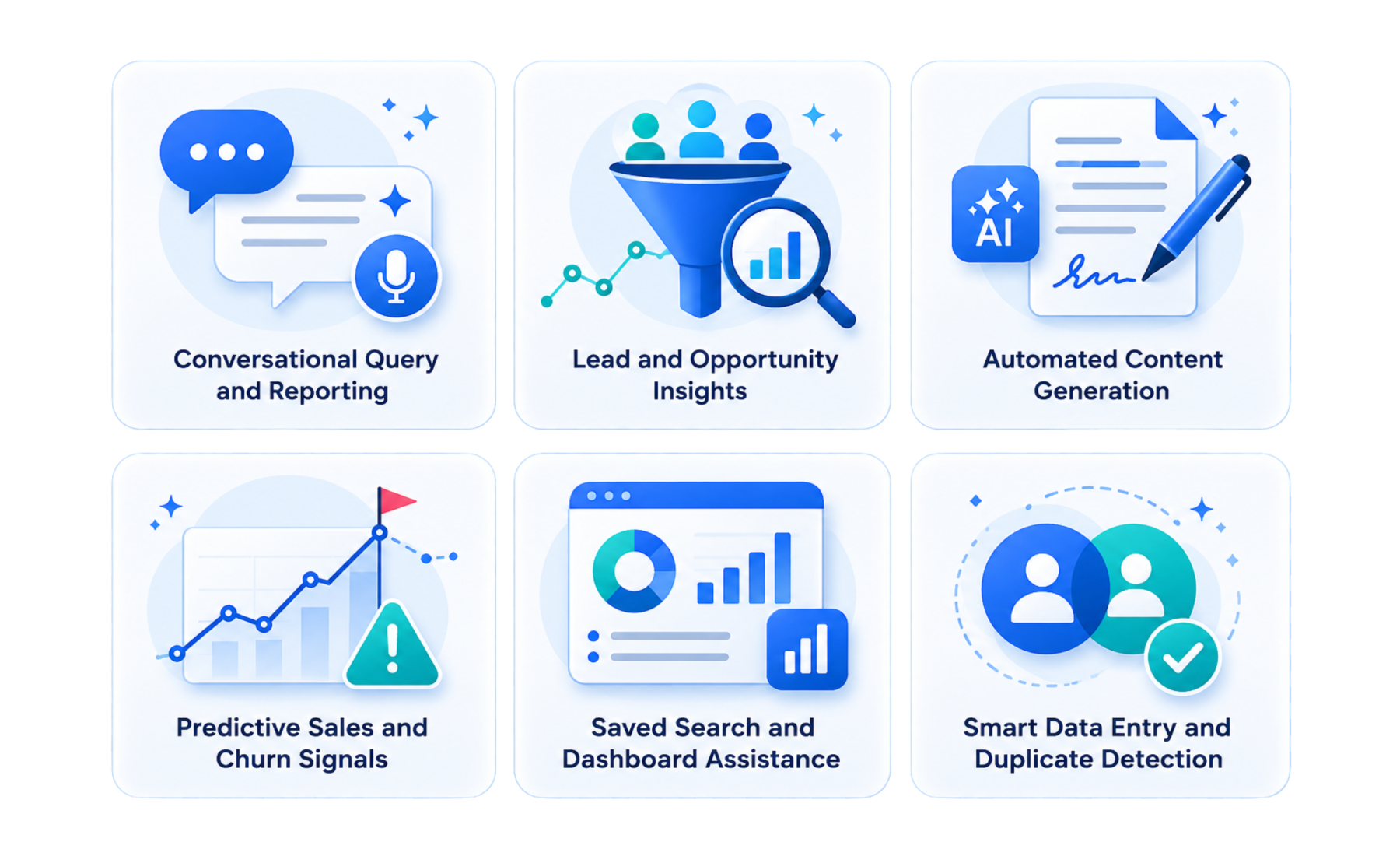
Conversational Query and Reporting
Users can type or speak questions such as "Which opportunities are closing this month" or "Show me leads from last week's webinar," and get an immediate, accurate answer. There is no need to know saved search syntax or wait on a report request.
Lead and Opportunity Insights
The AI Assistant reviews activity patterns across leads and open opportunities, flagging deals that have gone quiet, surfacing next-best-action suggestions, and highlighting which leads are most likely to convert based on historical behavior.
Automated Content Generation
Drafting follow-up emails, proposal language, or product descriptions used to eat up hours of a rep's week. The AI Assistant generates first drafts directly inside CRM records, which reps then review and personalize rather than starting from a blank page.
Predictive Sales and Churn Signals
By analyzing purchase history, engagement trends, and support tickets, the AI Assistant identifies accounts at risk of churning and flags upsell or cross-sell opportunities before a human would typically catch them.
Saved Search and Dashboard Assistance
Rather than manually configuring filters and criteria, users can describe the report they want in plain language, and the AI Assistant builds the underlying saved search or dashboard view automatically.
Smart Data Entry and Duplicate Detection
The AI Assistant identifies duplicate leads, contacts, and accounts as they are created, and can auto-populate missing fields using existing CRM and ERP data. This keeps records clean without requiring a manual deduplication pass, and prevents the same lead from being worked by two reps at once.
Benefits of Using NetSuite AI Assistant in CRM
- Faster Lead Follow-Up: Leads get flagged and routed the moment they enter the system, reducing the time between lead capture and first outreach.
- Less Manual Reporting: Teams spend less time building saved searches and dashboards from scratch, since natural language queries handle most day-to-day reporting needs.
- Better Forecast Accuracy: AI-flagged anomalies and trend detection give finance and sales leadership a more reliable forecast, built on real-time data rather than static end-of-month reports.
- Stronger Campaign ROI Visibility: Marketing teams can trace leads back to specific campaigns and channels more easily, making budget allocation decisions clearer and faster.
- Unified Account Visibility: Because CRM and ERP data live on the same platform, account teams see the complete picture, including order history, support tickets, and payment status, in one place instead of piecing it together across systems.
Real-World NetSuite AI Assistant Use Cases by Industry
Manufacturing and Distribution
Manufacturers and distributors typically manage large account bases with recurring, high-volume orders, which makes it easy for early warning signs to get buried in transaction history. The NetSuite AI Assistant reviews order frequency, order size, and payment timing across every account, then flags distributors whose ordering patterns are slowing down before a sales rep would notice on their own.
This matters most in relationship-driven B2B sales, where losing a distributor often shows up gradually rather than all at once. Instead of waiting for a quarterly review to catch a declining account, sales managers get a proactive alert with the account history attached, so outreach can happen while the relationship is still recoverable. The same data feeds reorder recommendations, helping account teams suggest the right quantities at the right time rather than relying on guesswork or the customer's own memory of what they typically order.
Professional Services and Consulting
Consulting and services firms run on utilization, renewals, and proposal turnaround time, three areas where the AI Assistant creates immediate, measurable impact. When a consultant or account manager needs to send a proposal, the AI Assistant drafts the first version directly inside the opportunity record, pulling in relevant scope language and past engagement details rather than starting from a blank template.
On the renewal side, the AI Assistant tracks utilization trends and engagement patterns tied to retainer and subscription-based contracts, flagging accounts where usage has dropped or where a contract is approaching renewal without recent activity logged. This gives account managers a window to re-engage a client well before the renewal conversation becomes urgent, rather than scrambling in the final weeks of a contract term.
Wholesale and Retail
Retail and wholesale businesses generate constant purchase and browsing data, but most teams struggle to turn that volume into timely action. The AI Assistant analyzes purchase history at the individual account and customer level to recommend relevant cross-sell and upsell items, the kind of recommendations that used to require a dedicated data analyst to produce manually.
Marketing teams benefit just as directly. Campaign attribution data tied to specific leads and orders makes it possible to see, in plain language, which channels and campaigns are actually driving revenue rather than just traffic or form fills. This closes a gap that often exists between marketing spend and sales outcomes, giving leadership a clearer basis for where to invest the next quarter's budget.
SaaS and Technology Companies
For subscription-based technology companies, churn is rarely a surprise if the right signals are being tracked; the problem is that those signals are often scattered across product usage logs, support tickets, and CRM notes that nobody reviews together. The AI Assistant pulls these signals into a single churn risk score, combining product usage trends with support ticket volume and sentiment to flag accounts before a cancellation request ever comes in.
Once an account is flagged, the AI Assistant can also draft renewal or re-engagement messaging tailored to that account's specific usage pattern, giving customer success teams a starting point rather than a blank inbox. This shortens the time between "risk detected" and "outreach sent," which is often the difference between saving an account and losing it.
Healthcare and Life Sciences
Healthcare and life sciences organizations operate under strict compliance and audit requirements, which makes both content generation and anomaly detection especially valuable here. The AI Assistant can draft compliance-aware communications and documentation, giving teams a starting point that already reflects the tone and structure required in a regulated environment, subject always to human review before anything goes out.
On the operational side, anomaly detection flags unusual vendor activity or irregular account records, the kind of discrepancies that are easy to miss manually but carry real compliance risk if left unchecked. Because every flagged anomaly comes with a clear audit trail showing why it was raised, teams can investigate efficiently instead of second-guessing the system's output.
Nonprofit and Membership Organizations
Nonprofits and membership-based organizations depend on consistent donor and member engagement, but outreach often falls behind after a major campaign or event ends. The AI Assistant scores donor and member engagement based on giving history, event attendance, and communication activity, helping development teams prioritize who to contact first rather than reaching out in the order records happen to appear.
Following webinars, fundraising appeals, or annual events, the AI Assistant can also trigger automated follow-up sequences for attendees or donors who have not yet responded, keeping momentum going without requiring staff to manually track every registrant or contributor by hand. Combined with campaign performance tracking across giving cycles, organizations get a clearer picture of which appeals and channels are actually converting into sustained engagement.
Construction and Engineering
Construction and engineering firms operate on long sales cycles built around bids and proposals, where a single missed follow-up can mean losing a project to a competitor. The AI Assistant tracks the health of the entire bid pipeline, flagging proposals that have gone stale or opportunities where no activity has been logged in longer than expected.
Because project milestones and account activity live in the same system, the AI Assistant can also connect delivery progress on active projects with account health, giving leadership an early signal when a client relationship may need attention before the next bid cycle begins. This reduces the reliance on individual project managers remembering to flag issues manually.
Financial Services
Firms in lending, insurance, and financial advisory work with sensitive account activity where irregularities need to be caught quickly. The AI Assistant continuously scans account and transaction-linked CRM data for unusual patterns, flagging anomalies that could indicate errors, fraud, or a client relationship at risk, well before those issues reach a compliance review.
Relationship managers also benefit from conversational queries that pull complete client portfolio summaries on demand, rather than waiting on a reporting team to compile the same information manually. This lets client-facing teams walk into a conversation fully informed, whether that conversation is a routine check-in or a response to a flagged concern.
Education and Training Providers
Educational institutions and training providers manage long, multi-touch enrollment funnels where inquiries can easily go cold without anyone noticing. The AI Assistant tracks every enrollment inquiry and flags prospective students or clients who have stopped engaging, giving admissions or enrollment teams a clear list of who needs follow-up rather than relying on manual pipeline reviews.
The AI Assistant also connects marketing campaign data directly to enrollment or course sign-up outcomes, so marketing teams can see which campaigns are actually producing enrolled students rather than just inquiries. Over multiple enrollment cycles, this creates a much clearer picture of where recruitment budget should be focused.
Getting Started: NetSuite AI Assistant Implementation Best Practices
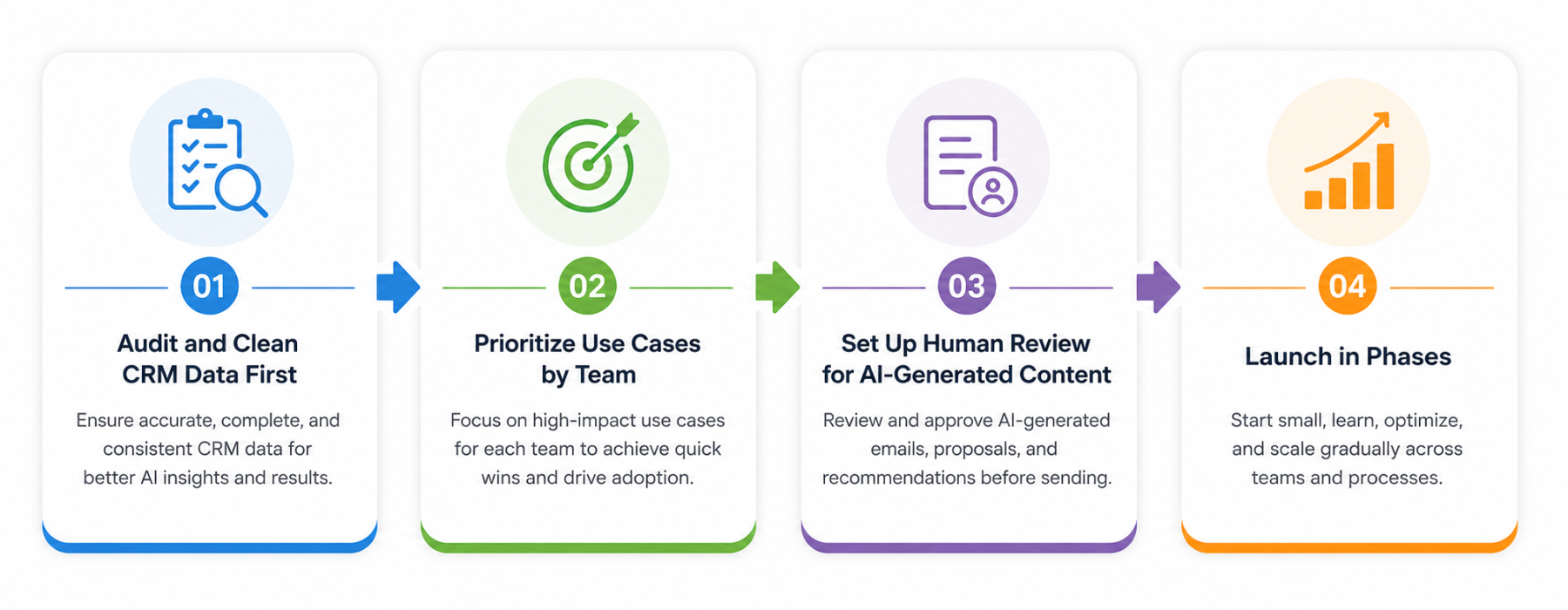
Audit CRM Data Before NetSuite AI Assistant Implementation
AI output is only as good as the data behind it. Duplicate contacts, inconsistent naming conventions, and incomplete records will weaken every recommendation the AI Assistant makes. A data audit should always come before configuration.
Prioritize NetSuite CRM AI Assistant Use Cases by Team
Sales, marketing, and support teams each have different priorities. Rather than turning on every feature at once, identify which use case delivers the fastest, clearest win for each team and start there.
Review NetSuite AI Assistant Content Before Publishing
Draft emails, proposals, and recommendations from the AI Assistant should always pass through human review before going out. This keeps brand tone consistent and catches errors before they reach a customer.
Launch NetSuite AI Assistant in Phases
A phased rollout, starting with one team or one process, gives organizations room to adjust configuration, train users, and build trust in the AI Assistant's output before expanding company-wide.
Businesses running commerce operations alongside CRM should also consider how AI Assistant insights connect with SuiteCommerce data, since purchase and browsing behavior from the storefront feeds directly into the same churn and recommendation models used across CRM.

Ready to Bring AI Into Your NetSuite CRM
The NetSuite AI Assistant works best when it is configured around your actual sales, marketing, and support workflows, not a generic template. TechWize helps you audit your data, prioritize the right use cases, and roll out AI Assistant capabilities in phases that fit your team's pace.
Talk to TechWizeWhy Choose TechWize for Your NetSuite AI Assistant Implementation
Rolling out the NetSuite AI Assistant is not simply a matter of flipping a switch. It requires clean data, clear team priorities, and a governance structure that keeps AI-generated content and recommendations under human review.
TechWize brings hands-on NetSuite implementation experience paired with dedicated AI Development expertise, meaning the AI Assistant rollout is configured around how your teams actually work rather than a generic, one-size-fits-all setup. From data readiness audits to phased rollout planning, TechWize helps organizations avoid the most common implementation missteps.
For businesses looking to extend beyond CRM and into deeper reporting and forecasting, TechWize's Data Analytics capabilities help connect AI Assistant insights with broader business intelligence, giving leadership a complete, accurate view of performance across sales, finance, and operations.
Whether you are just beginning to explore AI in NetSuite or looking to expand an existing rollout, TechWize helps align the NetSuite AI Assistant with your actual business processes, not just the software's default settings.
Read Similar Blog
NetSuite Next: NetSuite's AI-Powered ERP Guide for Businesses in 2026
Explore More Netsuite Insights ⬩➤Conclusion: A Strong Foundation for Future AI-Driven Growth
The NetSuite AI Assistant is reshaping what CRM software is capable of, moving teams away from manual reporting and reactive follow-up toward a system that surfaces insight before a human even asks for it. Across manufacturing, professional services, retail, technology, healthcare, nonprofits, construction, financial services, and education, the pattern is the same: less time spent digging for information, and more time spent acting on it.
Organizations that invest in clean data, clear governance, and a phased rollout today will be the ones positioned to get the most value as NetSuite continues expanding its AI capabilities. The technology is ready. The question is whether your NetSuite environment and your team are ready to put it to work.
Looking to plan your NetSuite AI implementation the right way? Talk to TechWize about a rollout built around your business, not a generic template.