
 501, Fifth Avenue, Suite 805 New York, NY 10017
 info@techwize.com
 +1 (949) 887-0154
 TechWize
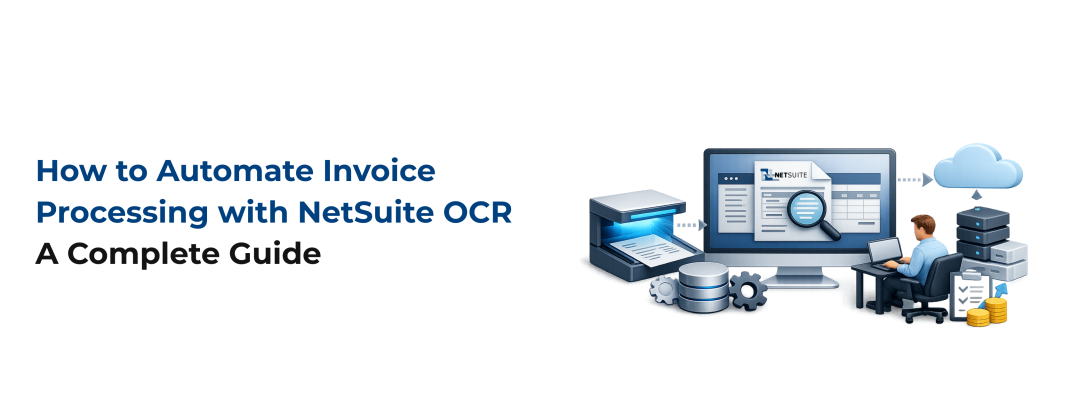
Manually keying in invoice data is still one of the biggest time drains in accounts payable. Between chasing approvals, matching purchase orders, and fixing data entry errors, finance teams lose hours every week on work that adds no strategic value. This is exactly the gap that NetSuite Optical Character Recognition was built to close.
NetSuite OCR uses automation and machine learning to scan invoices, pull out the relevant fields, and push clean, structured data into your ERP. In this guide, we will break down how OCR in NetSuite actually works, compare native versus third-party options, and show how a properly planned NetSuite Next Implementation can take your AP automation strategy even further.
What Is NetSuite OCR?
At its core, NetSuite OCR is technology that reads scanned documents, PDFs, or images and converts the text into machine-readable data. Instead of an AP clerk manually typing in invoice numbers, vendor names, and line items, OCR captures that information automatically and maps it to the correct fields in NetSuite.
Most finance teams do not use OCR as a standalone tool. It is typically deployed as part of a broader NetSuite AP automation platform that also validates invoice data, routes approvals, and synchronizes everything back into the ERP in real time. Think of OCR as the entry point of the automation pipeline, the step that turns a static document into usable data.
Why Finance Teams Need OCR in NetSuite
Finance teams that still process invoices manually run into the same recurring problems:
- Slow data entry: tedious keying of invoice fields and GL coding
- Approval bottlenecks: documents stuck waiting on approvers who are traveling or working remotely
- Human error: duplicate payments, mismatched totals, and mistyped fields
- Compliance exposure: missed tax deadlines and incomplete vendor documentation
- Delayed financial close: reconciliation that drags on because AP data was not entered on time
NetSuite invoice automation addresses each of these directly. Instead of routing paper or PDF invoices through inboxes and shared drives, OCR captures the data the moment an invoice arrives, flags anything that looks off, and moves the document into an approval queue automatically. Approvers can act from anywhere, and the AP team spends far less time answering "where is my payment" emails from vendors, since automated portals give suppliers visibility into their own invoice status.
There is also a compliance angle that often gets overlooked. Tax documentation, such as W-9 or W-8 forms, needs to be collected and verified before the first payment goes out. When that process is manual, forms go missing, TINs go unverified, and companies risk penalties for incorrect information returns. NetSuite document processing built on OCR reduces this risk by capturing and validating data consistently, every time.
How NetSuite OCR Works in Invoice Processing
A typical NetSuite OCR integration follows five steps:
- Invoice capture: the system scans incoming invoices using OCR and machine learning, whether they arrive by email, upload, or drag and drop
- Data extraction: key fields such as invoice number, date, PO reference, vendor details, line items, and totals are pulled out automatically
- Validation: the extracted data is checked for accuracy and cross-referenced against existing records to catch duplicates
- Approvals: the invoice is routed automatically to the correct approver based on predefined workflow rules
- ERP sync: validated data is synced back to NetSuite in real time, updating the sub-ledger instantly
This is where NetSuite invoice data extraction earns its value. The more accurately OCR captures fields like PO numbers and line item details on the first pass, the less rework your AP team has to do later. High-quality extraction is also what makes automated two-way and three-way matching possible, since the system needs clean data to compare invoices against purchase orders and receiving records.
NetSuite Native OCR vs Third-Party OCR Integration
NetSuite does not include OCR out of the box. To get this functionality natively, companies need to add the NetSuite Bill Capture module, which uses OCR and AI to scan invoices and populate fields. It is a reasonable option, but it comes with tradeoffs compared to a dedicated third-party AP automation platform.
| Factor | Native NetSuite OCR | Third-Party OCR Integration |
|---|---|---|
| Accuracy | Dependent on manual review and correction | High accuracy through continuous machine learning |
| Scalability | Costs increase with volume tiers | Built to scale with volume and global complexity |
| PO matching | Manual, time-consuming | Automated with side-by-side discrepancy resolution |
| Supplier onboarding | Manual, staff-intensive | Self-service, with tax forms and payment details collected upfront |
| Tax compliance | Manual W-9/W-8 tracking, higher error risk | Automated TIN matching and withholding calculations |
| Multi-entity support | Available through NetSuite OneWorld | Built-in entity-level and consolidated reporting |
For companies operating across multiple subsidiaries or countries, a dedicated NetSuite OCR integration generally offers more flexibility and fewer manual workarounds than relying on native functionality alone.
Key Features to Look for in NetSuite OCR Software
Not all OCR tools are built the same. When evaluating options, look for:
- AI-enhanced data capture: machine learning that improves extraction accuracy over time
- Global and multi-entity support: the ability to handle multiple currencies, subsidiaries, and regulatory requirements
- PO matching: automated two-way and three-way matching against purchase orders and receiving reports
- Approval workflows: automated routing with notifications to prevent bottlenecks
- Supplier self-service: onboarding portals that collect tax forms and payment details before the first invoice is paid
- Tax and VAT validation: built-in TIN matching, withholding calculations, and VAT checks
- Bi-directional ERP sync: real-time synchronization with NetSuite to eliminate manual re-entry
These features are what separate basic document scanning from genuine NetSuite AP automation. Companies that focus only on the OCR layer, without the surrounding workflow and compliance tools, often end up solving one bottleneck while creating another downstream. This is also why the benefits of NetSuite OCR are strongest when the tool is implemented correctly from the start, not added as an afterthought.
NetSuite ERP Implementation: Taking NetSuite OCR Further
If your organization is already planning a broader ERP rollout, this is the right moment to think beyond OCR alone. A well-planned NetSuite Implementation gives you the opportunity to build automated invoice processing, approval workflows, and compliance checks into your environment from day one, rather than bolting them on after go-live.
-
NetSuite Implementation Services
A structured NetSuite Implementation Services engagement means OCR, AP automation, and ERP synchronization are configured together as one connected system, instead of being layered on piecemeal over time. This reduces rework and gets your finance team to full automation faster, since workflows, approval rules, and data fields are mapped correctly the first time.
-
NetSuite Integration Services
For companies with existing tools that need to talk to NetSuite, NetSuite Integration Services connect OCR platforms, payment systems, and other finance software into a single environment. Rather than managing disconnected point solutions, integration services ensure data flows automatically between systems, keeping your invoice and payment records accurate across the board.
-
NetSuite Data Migration Services
Data quality is also critical during any ERP transition. NetSuite Data Migration Services move historical vendor records, invoice history, and payment data into the new environment cleanly, so OCR and AP automation workflows have accurate data to work with from the start. A poorly executed migration can undermine even the best automation setup, since OCR and matching logic depend on clean underlying records.
-
Why Pair NetSuite OCR With a NetSuite Implementation
Pairing OCR with a NetSuite Implementation project is not just about adding new features. It is about making sure implementation, integration, and migration are handled correctly so that automation actually delivers the efficiency gains it promises, instead of introducing new data problems down the line.

Ready to Automate Your Invoice Processing?
Manual invoice entry is costing your finance team time it doesn't need to lose. TechWize helps you implement NetSuite OCR and AP automation the right way, from data capture through ERP sync, so your team can focus on higher-value work instead of chasing paperwork.
Talk to a NetSuite ExpertWhy Choose TechWize for NetSuite OCR and NetSuite Implementation Services
Getting OCR and AP automation right requires more than good software. It requires an implementation partner who understands both the technical configuration and the finance workflows behind it.
TechWize brings deep NetSuite expertise to every stage of this process, from initial NetSuite Implementation Services planning through NetSuite Integration Services and NetSuite Data Migration Services. The team works closely with finance stakeholders to configure OCR, approval workflows, and compliance checks in a way that fits how your AP team actually operates, not a generic template.
Whether you are adding OCR to an existing NetSuite environment or planning a full NetSuite Implementation, TechWize can help you avoid the common pitfalls, such as poor data mapping, incomplete approval workflows, and messy historical data migration, that slow down so many AP automation projects. If you are evaluating your options, reach out to TechWize for a consultation on your NetSuite OCR and implementation roadmap.
Read Similar Blog
NetSuite Implementation Checklist: 10 Things to Get Right Before You Sign
Explore More NetSuite Insights ⬩➤Conclusion: NetSuite OCR for Long-Term Invoice Processing Automation
NetSuite OCR is the foundation of modern, automated invoice processing. Still, it works best as part of a complete AP automation strategy that includes validation, approvals, ERP sync, and compliance checks. Whether you choose native Bill Capture or a third-party OCR integration, the goal is the same: faster invoice processing, fewer errors, and stronger tax and regulatory compliance.
For companies ready to go further, combining OCR with a well-executed NetSuite Professional Services Automation (PSA) solution sets up your finance team for long-term efficiency, not just a short-term fix.