
 501, Fifth Avenue, Suite 805 New York, NY 10017
 info@techwize.com
 +1 (949) 887-0154
 TechWize
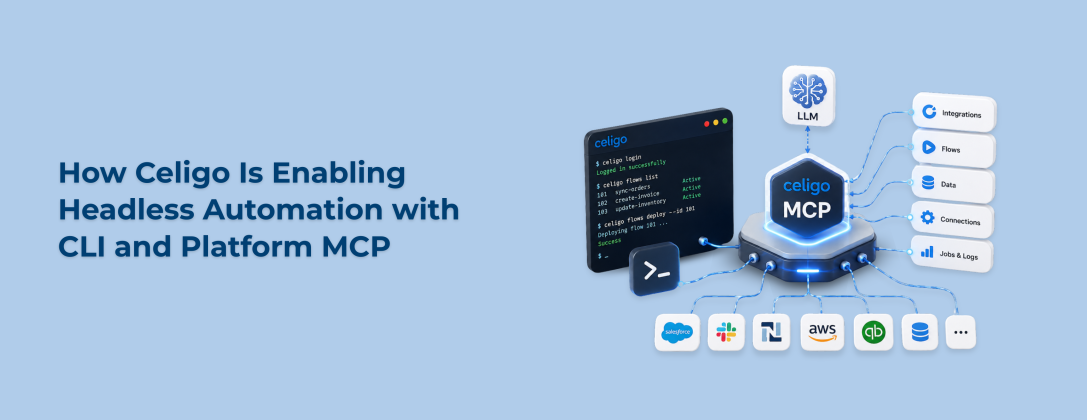
For years, working with an integration platform meant one thing: open a browser, log into the console, and do everything inside someone else's interface. That was just the deal. You went where the tool lived.
But that is not really how teams work anymore. Developers live in their terminal and their IDE most of the day. Business and AI-first teams are increasingly getting things done by just talking to an LLM. And honestly, asking either group to keep hopping back into a separate browser tab every time they need to work with an integration was always going to be a problem eventually.
That is the gap Celigo Headless Automation is built to close. Instead of forcing people into the UI, Celigo now appears in the Celigo CLI (Command Line Interface) and the Celigo Platform MCP, meeting developers and AI-first users exactly where they already spend their time. And here is the part that stood out to me while researching this: the market data backs up why this shift matters right now. The global iPaaS market is on track to hit roughly 17 billion dollars in 2026, growing at well over 30 percent a year (source: Business Research Insights). That is not a niche corner of software anymore. That is a category everyone is racing to make faster and easier to use.
This post breaks down what Celigo Headless Automation actually is, how the CLI and Platform MCP work under the hood, and which one fits your team better.
What Is Celigo Headless iPaaS? Understanding the Real Meaning Behind Celigo Integration Solutions
Headless iPaaS, in plain terms, means you can use the full power of an integration platform without ever opening its visual interface. No dashboard, no clicking through screens. Just commands or conversation.
Here is the thing nobody really says out loud about most "headless" product launches: they are usually half-finished. A vendor announces a CLI or an API mode, and you get excited, until you realize you can only read data, not actually change anything. You hit a wall the moment you try to do real work, and you get shoved right back into the browser anyway.
Celigo's Integration Solutions took a different stance here. If something is possible in the Celigo UI, it should be equally possible via the CLI or through an LLM conversation via MCP. No partial access, no "read-only" catch. That only works because Celigo's core platform APIs already expose full functionality, not a trimmed-down subset built just for headless use (source: Celigo product announcement, June 2026). Permissions carry over exactly too. Whatever access you have in the UI is what you get in the CLI or MCP, nothing more, nothing hidden.
It is worth saying this plainly, since it is easy to misread: none of this replaces the Celigo UI. Plenty of teams will keep building on the visual canvas because it is genuinely the best tool for much of their integration design work. Headless access is additive. It is there for the moments when jumping into a browser is the wrong move, not a replacement for the moments when it is the right one.
Headless Celigo iPaaS Automation Using the Celigo CLI (Command Line Interface)
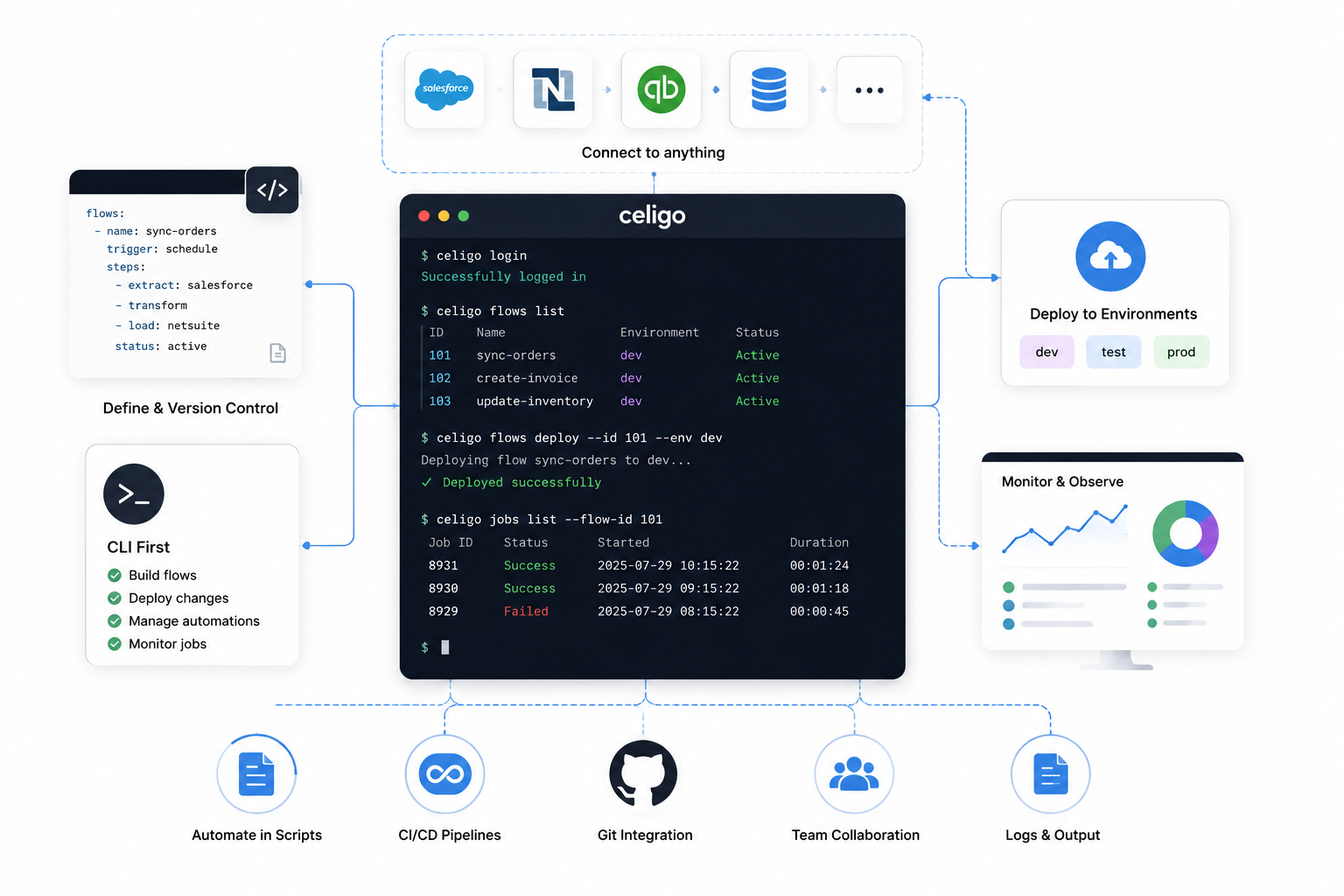
What the Celigo CLI Does for Integration Developers
The Celigo CLI puts the entire platform behind your command line. You build flows, manage automations, and monitor jobs the same way you already do everything else at work: typing commands, piping output into scripts, and keeping it all in the same window as your code editor and your git history.
This matters more than it might at first seem. Developers spend the overwhelming majority of their working hours in the terminal and IDE, often alongside AI coding assistants like Claude Code, Cursor, Windsurf, or Codex. Asking someone to break that flow to configure an integration in a browser tab is a small friction that adds up fast across a team. The same seamless experience also powers AI-driven data analytics, enabling secure access to business data for faster insights, reporting, and intelligent applications.
Celigo CLI Skills: Packaged Domain Knowledge for AI Coding Assistants
Here is where it gets genuinely interesting, and honestly a bit overdue for the iPaaS space. The CLI ships with a set of "skills," which are basically packaged domain knowledge about how Celigo actually works under the hood. Workflow guides, field schemas, common mistakes, the kind of thing a senior integration developer would tell a new hire.
Without that packaged context, AI assistants tend to guess. And guessing with API calls is exactly where things go sideways. You end up with invented field names, made-up endpoints, and JSON payloads that just will not validate. Anyone who has tried prompting a coding assistant against an unfamiliar API knows this pain firsthand. The skills built into the CLI are specifically designed to prevent that from happening.
Real-World Example: Creating a Lookup Cache via Natural Language with Celigo CLI
Celigo's own product team shared a simple example that captures this well. A developer can type something as plain as: "write a lookup cache in my Celigo instance that has the 50 US states and their abbreviations." Instead of the assistant guessing at a payload structure, it uses the CLI's packaged knowledge to generate the correct request and deploy the lookup cache immediately (source: Celigo product blog, June 2026).
That same pattern works for monitoring errors, adding users, or building new assets. It is a small example, but it is the kind of thing that used to take five minutes of clicking through menus, and now takes one sentence.
Celigo Platform MCP Integration for LLM-Based Automation
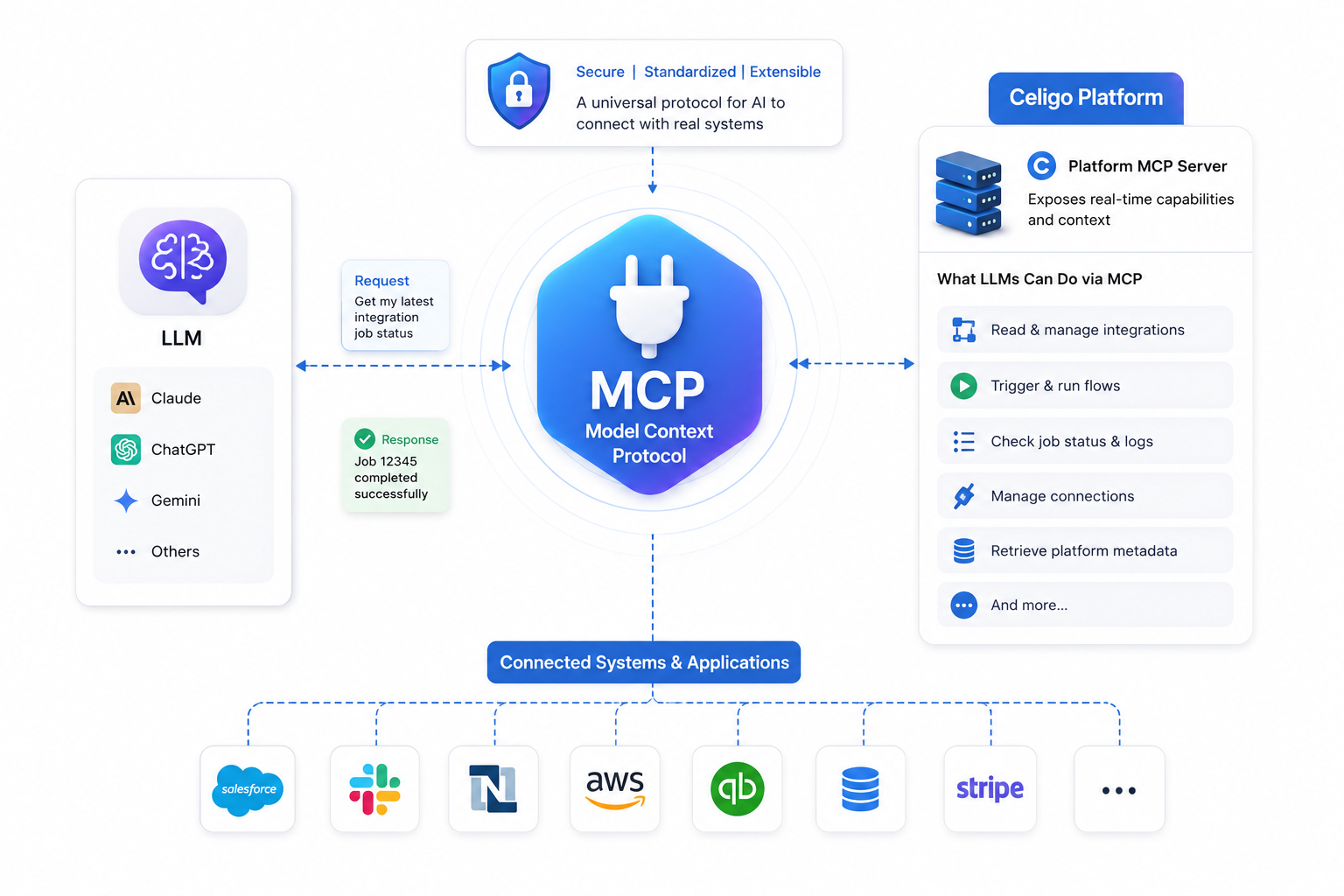
What Is MCP (Model Context Protocol)? A Simple Explanation for Integration Teams
MCP, short for Model Context Protocol, is basically a standard way for an LLM to talk to outside systems and tools. Think of it as a universal plug that lets an AI model connect to a platform's actual capabilities rather than just guessing from training data.
Anthropic first introduced MCP in November 2024, and adoption since then has been fast by any software standard. As of mid-2026, roughly 28 percent of Fortune 500 companies already run MCP servers in some form, and monthly SDK downloads across the ecosystem have climbed to around 97 million (source: MCP Adoption Statistics 2026). So when Celigo built Platform MCP, it was plugging into a standard that was already becoming the default way serious companies connect AI to their systems, not betting on something speculative.
What Celigo Platform MCP Exposes: 25+ Tools for AI-First Automation
Celigo Platform MCP connects directly to whichever LLM you already use, whether that is Claude, ChatGPT, Gemini, or another MCP-compatible assistant. Behind the scenes, it exposes more than 25 tools that the model can call on directly, covering the same range of actions available in the UI (source: Celigo product blog, June 2026).
Setup is a standard OAuth sign-in. No tokens to copy manually, no configuration files to wire up by hand. Connect once, and the model inherits your exact platform permissions, making AI development faster, simpler, and more secure.
Celigo Platform MCP in Practice: Real Use Case Walkthrough
The clearest way to understand this is through an actual exchange. Someone asks their assistant, "Did the Shopify to Stripe payment sync flow fail overnight?" The assistant, working through Celigo MCP, checks the platform directly and responds that a specific flow failed at a specific time, with a specific error count and cause, then offers to pause the flow until it is fixed.
The person replies, "Yes, pause it and generate an audit log of who last touched that connection," and the assistant does exactly that without anyone opening a dashboard. That is the entire point of an AI Integration Platform working this way. The conversation is the interface.
Celigo CLI vs Celigo Platform MCP: Which Headless Option Fits Your Team
Both options pull from the same underlying platform APIs, so neither one gives you less capability than the other. The real difference comes down to who is using it and where they naturally already work.
| Factor | Celigo CLI | Celigo Platform MCP |
| Best fit for | Developers and integration engineers | Business teams and AI-first users |
| Primary surface | Terminal and IDE | LLM conversation (Claude, ChatGPT, Gemini) |
| Setup | Install via npm | Standard OAuth sign-in |
| Strength | Scripting, automation, git-based workflows | Natural language flow management and monitoring |
| Extra capability | Ships with packaged "skills" for AI coding assistants | Exposes 25+ callable tools directly to the model |
If your day already runs through git commits and terminal windows, the CLI slots right in. If your day runs through Slack threads and chat windows with an AI assistant, Platform MCP is the more natural fit. A lot of teams will realistically end up using both, depending on who is doing the work.
Why Headless Access Is the Future of AI Integration Platforms Like Celigo
The direction here is not really in question anymore. Over 62 percent of enterprises have already adopted some form of cloud-based integration framework, and more than half say real-time data exchange is now a top priority (source: Global Growth Insights). Layer AI assistants on top of that, and the natural next step is to make the platform itself accessible from wherever those assistants already operate, rather than forcing a detour through a separate login screen.
My honest take after going through this: the bigger shift here is not really about the CLI or MCP as individual features. It is that integration platforms are quietly becoming something you talk to and script against, rather than something you visit. That is a meaningfully different relationship with the tool, and it changes what "using an iPaaS platform" even means day-to-day.
This same logic is playing out across the broader automation space, not just at Celigo. Teams running Dell Boomi iPaaS Automation Services are watching similar headless and API-first patterns emerge, and businesses leaning on n8n Workflow Automation Implementation Services are seeing AI agents take on more of the routine orchestration work as well. It is less a Celigo-specific trend and more a signal of where integration tooling is heading in general.

Ready to Put Celigo Headless Automation to Work?
Whether your team runs on the Celigo CLI, Platform MCP, or a mix of both, getting the setup right from day one makes all the difference. TechWize can walk through your current flows and help you build a headless automation plan that actually fits how your team works.
Talk to a Celigo ExpertTechWize: Get Expert Celigo iPaaS Integration Services
If you are looking at all of this and thinking it sounds promising but you are not sure where to start, that is a pretty normal reaction. Rolling out headless automation well takes more than just installing a CLI or connecting an MCP server; it takes someone who actually understands how your existing flows, connections, and business logic fit together.
TechWize is a certified Celigo partner that works with teams on exactly this, from initial Celigo iPaaS Services consulting through implementation and ongoing optimization. Their team has hands-on experience with ERP, CRM, and eCommerce integrations, and they can help you determine whether the CLI, Platform MCP, or a mix of both makes sense for how your team actually works. Alongside Celigo work, TechWize also supports broader AI Development Services and Data Analytics initiatives for teams looking to extend automation further than integration alone.
Read Similar Blog
How Celigo Ora and Agent Builder Revolutionize Automation
Explore More Celigo Insights ⬩➤Conclusion: Why Celigo Headless Automation Is the Next Step for Your Integration Strategy
What Celigo has built here is not a stripped-down alternative to its UI; it is the same platform showing up in more places at once. The CLI meets developers where they already work. Platform MCP joins the conversation everyone else is already having with their AI assistant. Neither one asks you to change how you work to fit the tool.
Whether that is worth adopting right away depends on your team, honestly. Some teams will jump straight to letting an AI assistant pause flows and pull audit logs overnight. Others will start smaller, maybe just scripting a few repetitive tasks through the CLI first. Either way, the direction is set. Integration work is following people into the terminal and the chat window, and it does not look like it will turn back toward the browser anytime soon.
Frequently Asked Questions
What is Celigo CLI and how does it work?
Celigo CLI is a command-line tool that gives developers full access to the Celigo platform from their terminal, letting them build, manage, and monitor integrations using typed commands rather than a visual interface.
What is Celigo Platform MCP?
Celigo Platform MCP is an implementation of the Model Context Protocol that connects Celigo directly to LLMs like Claude, ChatGPT, or Gemini, exposing more than 25 platform tools the model can call during a conversation.
Does Celigo MCP replace the Celigo UI? No.
Celigo Platform MCP and the CLI are additive to the UI, not replacements for it. Many teams continue building visually while using headless access for monitoring, quick fixes, or AI-assisted tasks.
What LLMs does Celigo MCP support?
Celigo Platform MCP works with any MCP-compatible LLM, including Claude, ChatGPT, and Gemini.
How is Celigo's headless access different from other iPaaS CLI tools?
Many CLI- or API-first offerings from other platforms expose only partial functionality, often with read-only access and no ability to configure or change anything. Celigo built its headless access on the same core platform APIs used by the UI, so functionality is not reduced.
What permissions do CLI and MCP users have?
Users inherit the same permissions via the CLI or Platform MCP that they already have in the Celigo UI, and personal access token controls govern these permissions.