
 501, Fifth Avenue, Suite 805 New York, NY 10017
 info@techwize.com
 +1 (949) 887-0154
 TechWize
NetSuite provides a strong foundation for managing finance, operations, CRM, inventory, and other core business processes. But as your organization grows, standard NetSuite functionality may not always keep pace with increasingly complex workflows. Manual data entry, Excel-based reporting, custom approval processes, disconnected applications, and repetitive tasks can create operational bottlenecks.
In fact, IDC’s 2025 SaaS ERP research found that 65.4% of surveyed organizations expect their ERP spending to increase, with additional modules, innovative capabilities, analytics, and new features among the key investment areas. For businesses looking to extend their ERP without replacing it, NetSuite customization and custom SuiteApp development offer a practical way to automate processes, integrate systems, improve reporting, and tailor NetSuite to specific business requirements.
Custom SuiteApp development is the practice of building purpose-built applications on top of NetSuite using Oracle's own toolset, rather than forcing a generic module to do a job it wasn't designed for. Done right, it turns NetSuite from a rigid system of record into something that actually bends around how your business runs. Done poorly, it turns into a pile of scripts nobody wants to touch. This guide walks through both sides of that coin, honestly.
Why Businesses Invest in SuiteApp Development
Businesses invest in custom SuiteApps because generic ERP workflows rarely match specific industry needs. A manufacturer's shop-floor process looks nothing like a subscription SaaS company's billing cycle, and NetSuite's standard modules can't cover every edge case across every industry.
The numbers back this up. Organizations running properly implemented ERP systems report roughly a 66% improvement in operational efficiency and around a 62% cost reduction, with 83% of companies saying their pre-implementation ROI expectations were met (source: Anchor Group NetSuite ERP Statistics). That's not a small margin. And here's the thing nobody mentions in the sales pitch: most of that value doesn't come from NetSuite itself; it comes from how well the customization layer fits the business underneath it.
I've seen companies buy the platform, skip the customization conversation to save budget, and end up right back where they started eighteen months later. The software was never the bottleneck. The fit was.
Key Trends Shaping Custom SuiteApp Development
A few shifts are changing how development teams approach NetSuite right now, and it's worth knowing them before you scope a project.
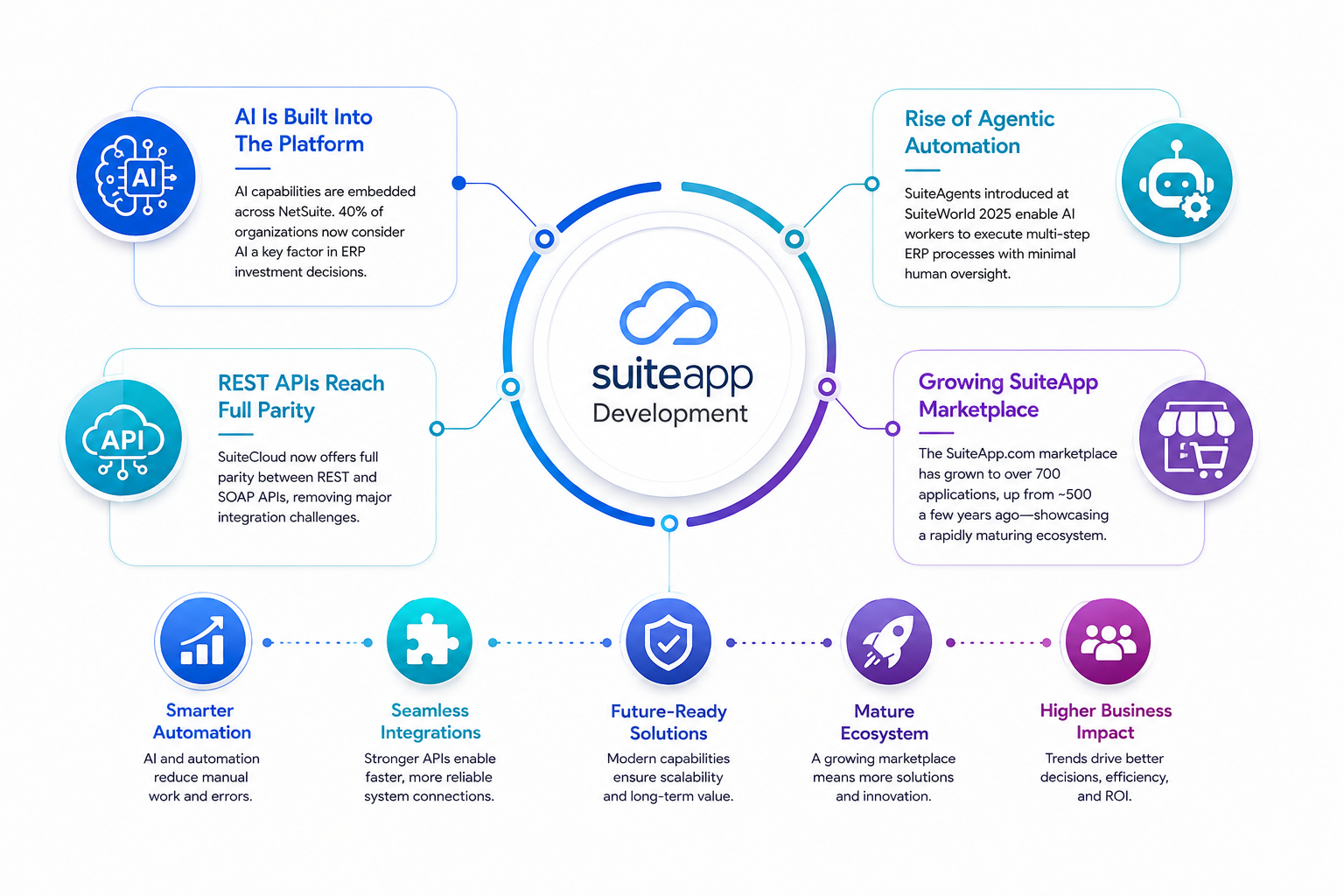
AI is no longer a bolt-on feature. Oracle has been embedding AI capabilities directly across the platform, and around 40% of organizations now say AI functionality is a key factor when evaluating ERP investments (source: Anchor Group NetSuite ERP Statistics). Oracle's SuiteWorld 2025 leaned hard into this with SuiteAgents. This agentic framework lets businesses deploy AI workers to run multi-step ERP processes without babysitting each step (source: ERP Peers). REST APIs have also reached full parity with SOAP in recent SuiteCloud releases, quietly removing one of the biggest headaches integration teams have dealt with for years (source: CircularEdge SuiteCloud 2026 report). And the SuiteApp.com marketplace itself has grown to over 700 listed applications, up from roughly 500 just a few years ago, which shows how quickly the ecosystem is maturing (source: Rioo App, NetSuite SuiteApps Explained 2026).
None of these trends replace custom development. They just raise the bar for what "custom" should mean in 2026.
When Do You Need NetSuite SuiteApp Development Services?
You need SuiteApp development services when standard NetSuite modules, workflows, or even marketplace apps no longer align with how your business actually operates. A few honest signals: your team is manually re-entering data between systems, approval chains don't reflect your real org structure, or reporting requires weekly exports to spreadsheets.
If any of that sounds familiar, that's usually the moment to bring in dedicated NetSuite customization expertise rather than duct-taping another workflow rule onto the last one.
Core Components of Modern Custom SuiteApp Development
A solid custom NetSuite build usually leans on a specific set of tools, and understanding what each one does helps you have a smarter conversation with whoever's building it. Here's the quick reference, then the detail underneath.
| Component | What It Does |
| SuiteCloud Development Framework (SDF) | Packages customizations as deployable, version-controlled project files instead of loose configuration |
| SuiteScript 2.1 | The modern scripting language used to build custom logic, records, and automation inside NetSuite |
| SuiteFlow Automation | A visual workflow tool for automating approvals, notifications, and record transitions without heavy scripting |
| SuiteTalk APIs | Web services that let external systems talk to NetSuite reliably |
| REST Web Services | Modern, lightweight integration layer that now matches SOAP in functionality |
| SuiteQL | A SQL-style query language for pulling complex data out of NetSuite fast |
| SuiteAnalytics | NetSuite's built-in reporting and dashboard engine for real-time visibility |
SuiteCloud Development Framework (SDF)
SDF is essentially the backbone of professional-grade NetSuite customization. Instead of clicking through the UI and hoping someone remembers what changed, SDF packages your custom objects, scripts, workflows, and configurations into version-controlled project files. That means every change lives in something like Git, can be reviewed before it ships, and can be rolled back cleanly if something goes sideways.
This matters more than most people expect going in. Without SDF, customizations tend to live only inside the NetSuite account itself, which makes moving them between sandbox and production a manual, error-prone mess. With it, you get a proper software development lifecycle, the same discipline any serious engineering team would expect from a codebase. Skip this step, and you're basically building on sand. I've watched teams learn that lesson the hard way, usually right before a big release when nobody can figure out which sandbox version actually matches production.
SuiteScript 2.1
SuiteScript 2.1 is where most of the real logic lives. It's a modern, promise-based scripting environment built on current JavaScript standards, and it has almost entirely replaced older SuiteScript 1.0 patterns. It supports asynchronous operations more cleanly, has better error handling, and plays nicer with modern development tooling overall.
If a developer tells you they're still writing fresh code in 1.0 in 2026, that's worth a follow-up question. It's not that 1.0 stops working; Oracle still supports it, but building new logic on an older framework usually means slower development now and a harder migration later. SuiteScript 2.1 handles everything from custom record behavior to scheduled processes to map/reduce jobs that crunch large datasets in the background without locking up the system for everyone else.
SuiteFlow Automation
SuiteFlow handles the visual side of things, approval chains, record status changes, email triggers, field updates, all built through a drag-and-drop interface rather than a script for every small rule. It's genuinely the tool that saves the most time for the least technical effort, honestly, and it's often the first place a good developer looks before reaching for code.
The catch is that SuiteFlow isn't built for heavy logic or complex calculations, so teams that try to force it to do everything usually end up with a workflow so tangled nobody can trace it anymore. The smart approach is to let SuiteFlow own simple, visual decision-making and hand anything genuinely complex over to SuiteScript.
SuiteTalk APIs
SuiteTalk is NetSuite's original web services layer, built on SOAP, and it's what many older integrations between NetSuite and external systems still run on. It lets external platforms create, update, and query NetSuite records programmatically, which is the backbone of most CRM, warehouse, and payment system connections.
It still works fine, and plenty of stable integrations rely on it today. But it's also showing its age next to newer options, which brings us to the next component.
REST Web Services
REST has matured significantly recently and, as of the latest SuiteCloud releases, now achieves full functional parity with SOAP-based SuiteTalk (source: CircularEdge SuiteCloud 2026 report). That's a bigger deal than it sounds. It means integrations built on REST are no longer a lighter, limited option; they're a genuinely modern replacement, easier to maintain, better supported by current tooling, and closer to how most external platforms expect to connect these days.
For any new SuiteCloud development work, REST is now the more commonly recommended path over older SOAP connections. If your team is still maintaining legacy SuiteTalk integrations, this parity update is a good opportunity to start planning a gradual migration.
SuiteQL
SuiteQL lets developers pull data with SQL-style queries instead of relying on clunky saved searches built through a UI. Once your NetSuite data volume grows past a certain point, and it always does, saved searches start to feel painfully slow and limited. SuiteQL gives you the flexibility to write precise, complex joins across records, as a database developer would, which speeds up reporting and custom logic that depends on pulling accurate data quickly.
SuiteAnalytics
SuiteAnalytics ties it all together with dashboards and reports that actually reflect what's happening in real time, not last week's export. It's NetSuite's native business intelligence layer, and when it's set up well, it removes a lot of the manual spreadsheet work that tends to pile up around month-end. Paired with SuiteQL underneath, teams get both raw data access and a visual reporting layer without needing a separate BI tool bolted on.
Best Practices for Custom SuiteApp Development
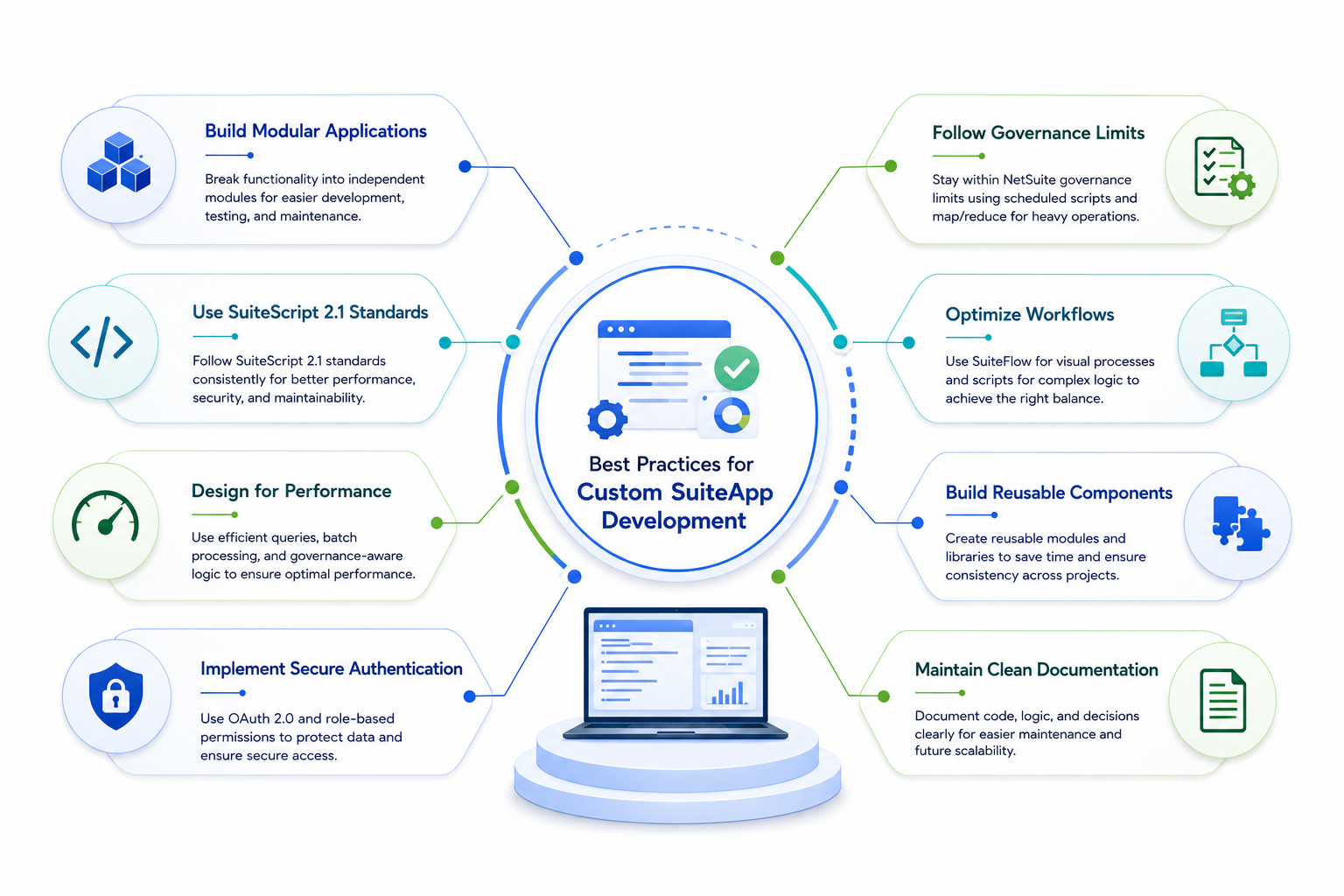
Good SuiteApp development follows a handful of disciplines that separate a maintainable system from a fragile one. None of these are complicated on their own; they just tend to get skipped under deadline pressure, and that's usually where things fall apart.
Build Modular Applications
Break functionality into independent pieces rather than one giant script that tries to do everything at once. A single monolithic script feels efficient at first, but the moment something breaks- and eventually something always does- you want to isolate the problem fast instead of untangling three hundred lines to find one bad condition.
Modular design also makes it much easier to hand pieces of a project to different developers without them stepping on each other's work. Think of it less as one big machine and more as a set of parts that can each be swapped out without affecting the rest.
Use SuiteScript 2.1 Standards
Consistency here matters more than people expect. Use SuiteScript 2.1 standards across the entire project, not as a "we'll upgrade it later" afterthought bolted onto a mostly 1.0 codebase. Mixing script versions within the same application creates confusion for anyone maintaining it later. Usually, it means missing out on the better error handling and async support that 2.1 was built for in the first place.
Design for Performance
Design for performance from day one, not after the first complaint about a slowdown. That means batch operations instead of record-by-record processing, efficient saved searches or SuiteQL queries instead of pulling entire datasets into memory, and governance-aware logic that accounts for real production data volumes rather than the small test set a script was originally built against.
Here's the thing nobody mentions early enough in a project: code that runs fine with 50 test records can fall apart completely with 50,000 real ones. Performance isn't something you bolt on later; it has to be part of the design conversation from the start.
Implement Secure Authentication
Every custom SuiteApp needs built-in authentication from the start, using OAuth 2.0 and role-based permissions rather than hardcoded credentials in a script. It sounds obvious written out like that, but hardcoded tokens and shared logins still show up more often than they should in older custom builds.
Role-based access also means users only ever see and touch what their actual job requires, which limits the damage if something does go wrong down the line.
Follow NetSuite Governance Limits
Follow NetSuite's governance limits religiously. Every script type has usage point restrictions, and scripts that hit those limits too aggressively will simply stop running mid-process. That's a genuinely miserable thing to debug in production, especially when it happens intermittently, depending on the day's data volume.
Good developers proactively design around these limits, using scheduled scripts and map/reduce jobs for the heavy lifting instead of cramming everything into a single user event script and hoping it finishes in time.
Optimize Workflows
Let each tool do what it's actually good at. SuiteFlow should handle simple visual decision-making, approvals, status changes, and notifications, while scripting handles anything genuinely complex, such as multi-step calculations or logic that depends on external data. Flipping that balance either direction tends to create problems, either a workflow so overloaded it becomes unreadable, or scripts doing simple jobs that a workflow could have handled in a fraction of the time.
Build Reusable Components
Build reusable components your team can plug into future projects, instead of reinventing the wheel every time a similar need arises. A well-built custom module, a validation function, a shared library, a common integration pattern, saves real time on the next project, and the one after that. Teams that build this way end up with a genuine toolkit over time rather than a pile of one-off scripts that all solve the same problem slightly differently.
Maintain Clean Documentation
Maintain clean documentation as you go, not as a rushed afterthought before handoff. Document what each script does, why certain decisions were made, and where the tricky edge cases live. The person maintaining this system in two years probably isn't the person who built it, and undocumented logic that made perfect sense at 11 pm during a deadline sprint rarely makes sense to anyone six months later, including, honestly, the person who wrote it.

Ready to Build a Custom NetSuite SuiteApp for Your Business?
From planning and development to deployment and ongoing support, TechWize delivers custom NetSuite SuiteApp Development Services that streamline workflows, automate processes, and scale with your business needs.
Talk to Our NetSuite ExpertsHow to Secure Your Custom SuiteApp Development Project
Security in SuiteApp development starts with role-based access control, so users only see and touch what their job actually requires. Layer on OAuth 2.0 for all external integrations, encrypt sensitive data fields, and audit script permissions regularly rather than assuming they're still correct months later.
A quote that stuck with me from a NetSuite architect I worked alongside years ago: "Most breaches in customized ERP systems don't come from clever hackers. They come from a script that was given more access than it ever needed." That's still true today, and it's an important principle to follow with every custom build. As NetSuite Next introduces more AI-powered capabilities, autonomous workflows, and deeper platform integrations, applying least-privilege access, regular security audits, and governance best practices becomes even more critical to protecting your ERP environment.
A Complete Testing Strategy for SuiteApp Development Before Deployment
Testing a custom SuiteApp properly means running unit tests on individual scripts, conducting sandbox testing in an environment that mirrors production data, running user acceptance testing with the people who'll use it daily, and performing load testing if the app handles high transaction volumes.
Skipping sandbox testing is the single most common shortcut that comes back to bite teams. It feels fine until the day it doesn't, usually during month-end close, which is somehow always when things break.
Managing the Complete Lifecycle of Custom NetSuite Applications
A custom NetSuite application isn't a one-and-done project; it's something you manage throughout its full lifecycle: planning and requirements gathering, development and testing, deployment, and ongoing monitoring and iteration as NetSuite releases new versions twice a year.
That last part surprises many first-time buyers. NetSuite regularly pushes major platform updates, and any custom ERP work needs periodic review to ensure it still plays nicely with the new release. Budget for that. Teams that treat their custom apps as "finished" the day they go live are usually the ones calling for emergency fixes six months later.
Transform Your ERP With TechWize NetSuite SuiteApp Development Services
If all of this sounds like a lot to manage in-house, that's fair; it usually is. This is where a team like TechWize tends to fit into the picture, bringing hands-on SuiteCloud expertise to handle the planning, building, and long-term upkeep of custom NetSuite applications so your internal team can stay focused on running the business rather than babysitting scripts. Worth a conversation if you're weighing your options for NetSuite implementation support.
Read Similar Blog
NetSuite Implementation Checklist: 10 Things to Get Right Before You Sign
Explore More NetSuite Insights ⬩➤Building Future-Ready NetSuite Applications
Custom SuiteApp development isn't really about writing clever code; it's about building something that still makes sense to your team a year from now, and still holds up when NetSuite ships its next platform update. The tools keep getting better, AI is genuinely changing what's possible on the platform, and the businesses getting the most out of NetSuite right now are the ones treating customization as an ongoing relationship rather than a one-time project. Where you take that from here probably depends less on the technology and more on how honestly you assess what your team actually needs.