
 501, Fifth Avenue, Suite 805 New York, NY 10017
 info@techwize.com
 +1 (949) 887-0154
 TechWize
If you're still running Dynamics AX, you already know the clock is ticking. AX 2009, AX 2012, AX 2012 R2, and R3 are no longer supported by Microsoft. They have all moved past the standard support window according to the Microsoft Lifecycle Policy. That doesn't mean your system stops working tomorrow. But it means you're lacking patches, missing security updates, and facing a minimal safety net.
This blog walks through what a Dynamics AX-to-Dynamics 365 migration looks like in practice. Not the marketing version. The real one, with real timelines, real cost drivers, and the kind of planning mistakes that quietly turn a six-month project into a fourteen-month one. So let's get into it.
Where Your Business Stands Today on the Dynamics AX Journey
Most organizations on AX today fall into one of two camps: they know they need to move but haven't started, or they've started and underestimated the scope. Neither is unusual. AX was built for a different era of software, on-premises, heavily customized, and designed around a business that probably looked different ten years ago than it does now.
Here's the thing nobody really says out loud: the longer you wait, the more it costs. Data piles up. Customizations multiply. And the eventual project only gets bigger. A Dynamics AX migration isn't just an IT decision anymore; it's a business continuity one.
Signs Your Organization Is Ready to Modernize
You're probably closer to migration-ready than you think if any of this sounds familiar. Your team spends more time maintaining custom code than using it productively. Reports take days to compile because data lives in five different places. Or your IT budget keeps growing just to keep an aging system limping along, with nothing left over for actual innovation.
If two or more of those ring true, that's not a coincidence. That's a system telling you it's time.
Why Enterprises Are Choosing Dynamics 365 Finance and Operations
So why are so many companies actually making the jump? Simply put, Dynamics 365 Finance and Operations gives you a cloud-based platform that keeps improving on its own, instead of one you have to overhaul every few years manually.
A Forrester Total Economic Impact study found that organizations moving from AX to Dynamics 365 in the cloud saw a 109 percent return on investment with a payback period of around six months (source: Forrester TEI study). That's a meaningful number, and it lines up with what we typically see in practice: lower infrastructure overhead, fewer emergency IT fixes, and teams that finally get real-time visibility rather than last week's numbers.
There's also the AI angle, which frankly wasn't even on the table when most AX systems were built. Predictive cash flow insights, automated demand forecasting, Copilot-assisted workflows- none of that existed in the AX era. It's not just an infrastructure upgrade. It's an upgrade in what the system can actually think through for you. Companies that pair this modernization with front-office upgrades, say, moving to Dynamic 365 CRM alongside their ERP transformation, tend to unlock even more value because the data actually talks to each other.
Dynamics AX to Dynamics 365 Finance and Supply Chain Migration: Choosing Between an Upgrade and Reimplementation
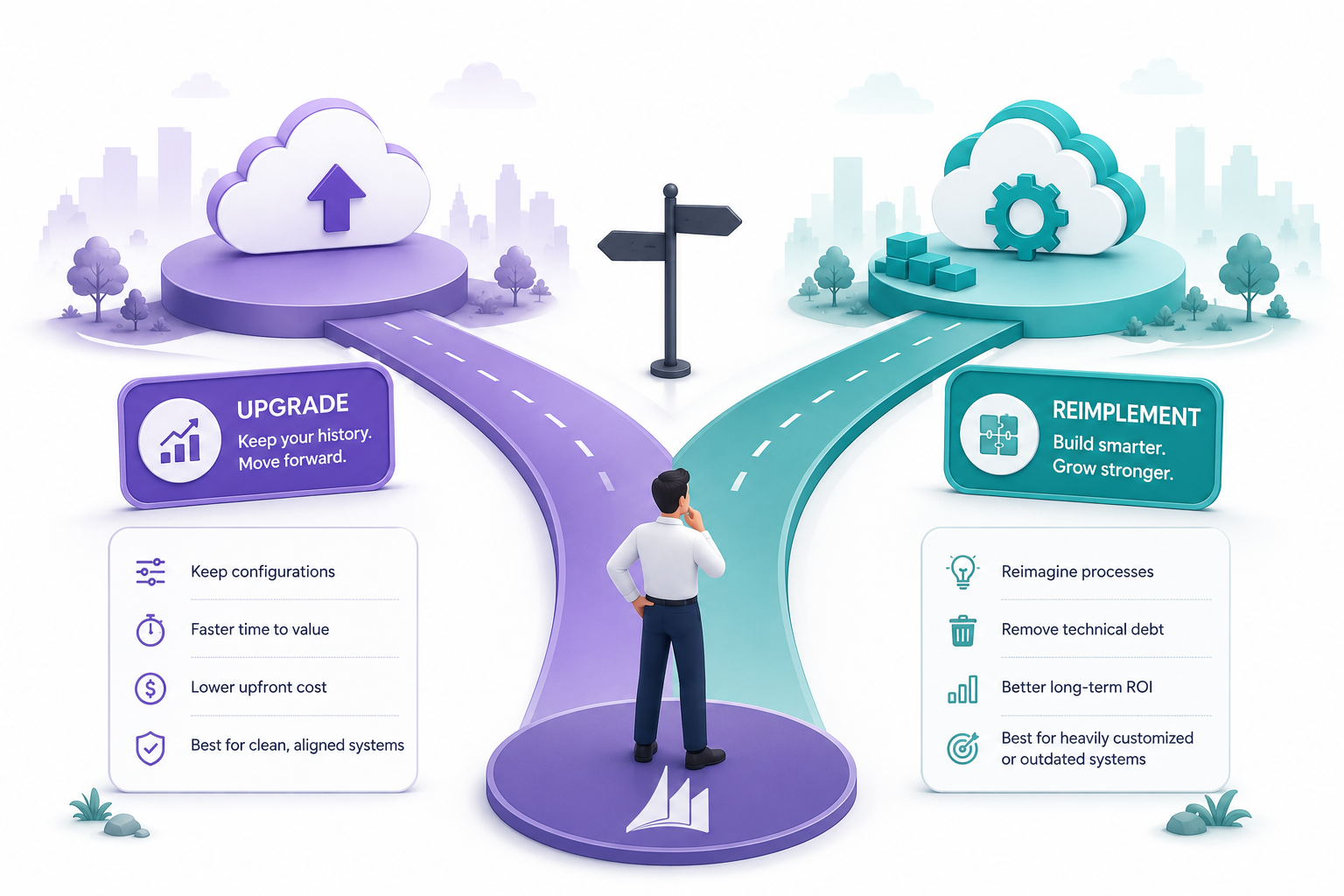
This is the fork in the road every AX customer eventually hits. Do you upgrade your existing system, carrying your processes and history forward? Or do you start fresh and rebuild around how your business actually works today?
Microsoft supports a direct technical upgrade path only from AX 2012 R2 and R3. If you're on AX 2009 or AX 4.0, that path simply isn't available; reimplementation becomes your only realistic option.
When a Direct Dynamics AX to Dynamics 365 Migration Makes Sense
A direct upgrade works well when your AX environment is relatively clean, your customizations still reflect how the business operates, and your processes haven't drifted too far from what's standard. In that case, an upgrade lets you keep your transaction history and configurations largely intact, while moving onto the modern platform.
When Reimplementation Delivers Better Long-Term ROI
But if your customization layer has grown into something nobody fully understands anymore (and let's be honest, this happens more often than companies admit), reimplementation is usually the smarter long-term bet. Yes, it costs more upfront. It also gives you the chance to shed a decade of technical debt and build the system around your business as it exists now, not as it existed when AX first went live.
| Factor | Upgrade | Reimplementation |
|---|---|---|
| Historical Data | Full transaction history carries over. | Master data and balances migrate, history archived. |
| Customizations | Converted and remediated. | Re-evaluated from scratch. |
| Best Suited For | Clean, still-relevant AX environments. | Heavily customized or outdated systems. |
| Supported AX Versions | 2012 R2 and R3 only. | Any version, including AX 2009. |
What Influences the Cost of an AX to Dynamics 365 Finance Migration
There's no single sticker price for this, and honestly, anyone who quotes one without first conducting an assessment is guessing. Cost depends heavily on how much custom code you're carrying, how large and messy your database is, how many integrations you're running, and how much internal team time you're willing to invest in testing and training.
Custom code remediation is usually the biggest line item. The more X++ code layered into your system over the years, the more analysis and rework it needs. Data volume matters too; a large, poorly maintained database takes longer to clean, upgrade, and validate before go-live.
If you want a realistic number instead of a guess, this is exactly what a proper assessment through Dynamics 365 Finance and Operations Consulting Services is meant to solve. It scans your actual environment and gives you a project-specific range, rather than an industry-average shot in the dark.
Dynamics AX to Dynamics 365 Finance and Supply Chain Migration: Phase-by-Phase Timeline

Most migration projects move through seven distinct phases, and skipping or rushing any of them tends to cause downstream problems. Depending on complexity, the full journey typically runs anywhere from a few months for smaller, cleaner environments to well over a year for large, multi-entity enterprises.
Phase 1 - Assessment and Environment Analysis
This is where you run Microsoft's upgrade analyzer tool against your current AX environment. It flags deprecated features, estimates data upgrade effort, and surfaces configuration issues before you spend a dollar on licensing.
Phase 2 - Data Cleansing and Preparation
AX databases accumulate a lot of dead weight over a decade: old batch logs, closed transactions, stale records. Purging and archiving this stuff early makes every later phase faster and cheaper.
Phase 3 - Code and Customization Review
Your X++ customizations get run through Microsoft's code upgrade tooling. This is also your best window to retire code that standard Dynamics 365 functionality now handles natively, which is more common than most teams expect.
Phase 4 - Integration and Reporting Updates
Old AX integrations generally will not connect to Dynamics 365 without rework. You need to inventory and rebuild every EDI connection, banking link, and third-party tool, using modern integration patterns such as OData or event-based approaches.
Phase 5 - Data Upgrade and Configuration
The first full data upgrade runs in a development environment, surfacing quality issues and conflicts before anything touches production. This step often reveals surprises: the OEM case study we referenced earlier saw their database grow from 1TB to 1.5TB after the first run due to automatically created indexes (source: Microsoft SMA program case study).
Phase 6 - Testing and User Validation
This is the phase that gets rushed most often, and it's the one that causes the most pain post-launch. Real users need to run real workflows- order-to-cash, procure-to-pay, financial close- before go-live, not after.
Phase 7 - Cutover and Go-Live
Cutover testing rehearses the entire production migration, timed step by step, so nobody's guessing on go-live weekend. Most companies schedule this for a weekend, followed by a hypercare period during which support remains elevated while users settle in.
Best Practices for a Smooth Dynamics 365 Finance and Supply Chain Management Migration
Start Data Cleansing Early, Not During Cutover
Waiting until cutover to clean data is one of the most common (and most expensive) mistakes teams make. Start this the moment the project kicks off, not the week before go-live.
Audit Customizations Before You Migrate, Not After
Go through every customization and ask honestly whether it's still needed, or whether standard functionality now covers it. Dropping code you don't need reduces both migration cost and future maintenance headaches.
Involve Business Users in Testing, Not Just IT
The smoothest go-lives we've seen are the ones where actual end users, not just IT staff, sign off on testing. IT can validate technical function. Only the people doing the daily work can validate that a process actually makes sense.
Build a Realistic Cutover and Rollback Plan
Rehearse the cutover before it happens for real. Know exactly how long each step takes, and have a rollback option ready in case something doesn't go as planned.
Choose Dynamics 365 Finance and Operations Implementation Services With Proven Migration Experience
This one matters more than people give it credit for. A partner who has actually run these migrations before knows where AX customizations hide, which ones can be safely retired, and how to avoid surprising the business mid-project. Experience here isn't a nice-to-have; it directly shapes your timeline and your budget.
Turning Common Dynamics 365 Finance and Operations Migration Challenges Into Wins
Every migration hits friction somewhere; that's just reality. But most of these "challenges" are actually opportunities in disguise. Legacy customizations you've been dragging along for years? That's a chance to retire technical debt. Messy data? That's your shot at cleaner, more trustworthy reporting going forward. Even user adoption resistance, uncomfortable as it feels in the moment, tends to build stronger digital fluency across teams once they're through it.
We've noticed something interesting working alongside enterprise teams: the companies that reframe migration as a modernization opportunity, rather than a forced technical chore, consistently end up happier with the outcome. Mindset actually changes execution.

Ready to Move Off Dynamics AX to Dynamics 365 Finance and Operations?
Every version of Dynamics AX is past its support lifecycle, and waiting only adds more data debt and technical debt to the eventual project. Let's map out a migration plan built around your systems, your data, and your timeline, not a generic template.
Talk to an ExpertBeyond Migration: Building an AI-Ready Enterprise with Dynamics 365
Here's the part that often gets overlooked. Migration isn't really the finish line; it's the foundation. Once you're on Dynamics 365, you're plugged into Microsoft's continuous update model, which means new AI capabilities arrive as part of the platform's natural evolution instead of requiring another disruptive overhaul years down the line.
Copilot for finance and supply chain, predictive cash flow forecasting, intelligent purchase order management- none of this was even conceptually possible in the AX era. And this AI readiness extends beyond ERP, too. Enterprises pairing their D365 foundation with tools like ServiceNow AI Agents are starting to automate cross-departmental workflows in ways that just weren't feasible on legacy infrastructure.
TechWize: Turn Your Dynamics 365 Migration into a Business Advantage
This is where a company like TechWize tends to fit into the picture, helping enterprises move from AX to Dynamics 365 without treating it as a purely technical lift-and-shift. The approach usually pairs migration planning with a broader look at how finance, supply chain, and customer-facing systems can work together. For organizations also modernizing their sales and marketing stack alongside ERP, this often means bringing in Dynamics 365 Business Central as part of the same connected AI roadmap, rather than treating each system as an isolated project.
Read Similar Blog
Top 7 Dynamics 365 Finance and Operations Companies in Canada
Explore More Dynamics 365 Insights ⬩➤Conclusion: The Right Time to Move Beyond Dynamics AX
There's no perfect moment to migrate; there's just a moment when the cost of waiting starts to outweigh the cost of moving. For most organizations still on AX, that moment has already arrived, whether the calendar says so or not. The real question isn't whether to move to Dynamics 365 Finance and Operations. It's whether you plan the move on your terms, with time to clean data, retire what you don't need, and test properly, or whether you end up doing it in a rush once something finally breaks. One of those paths is a lot cheaper than the other.