
 501, Fifth Avenue, Suite 805 New York, NY 10017
 info@techwize.com
 +1 (949) 887-0154
 TechWize


Unlocking a Successful ERP Transformation for Mid-Market Organizations
In today’s dynamic business environment, finance leaders are constantly looking for agile, scalable and insightful systems that can help manage the complexity of their financial operations — from multi-entity reporting to real-time analytics to compliance. Sage Intacct is the innovative and customer-focused provider of cloud financial management software.
But those benefits actually depend on the implementation of the system. A bad deployment can lead to incomplete data, low adoption, running operations in chaos and negative ROI incurred. On the positive side of that equation, but when implemented correctly, Sage Intacct is a prescription for efficiency improvements, user satisfaction and material performance uplift.
This guide provides detailed best practices from experienced ERP implementation consultants, drawing on industry insights and real-world implementation lessons.
Why Implementation Matters More Than You Think in 2026
Before diving into best practices, it’s important to understand the true impact of a Sage Intacct implementation:
ROI & Performance Gains: Organizations can see improvements such as faster close cycles, better reporting accuracy, and reduced manual work post-implementation.
Strategic Transformation: Implementation isn’t just software setup — it’s a chance to rethink processes, automate controls, and align financial workflows to strategic goals.
Risk Management: Poor implementations often fail due to inadequate planning, insufficient training, rushed migrations, or misunderstanding system capabilities.
Because of these stakes, a structured, phased, and well-supported implementation approach is essential.
Sage Intacct Implementation: A Step-by-Step Approach for Finance Leaders
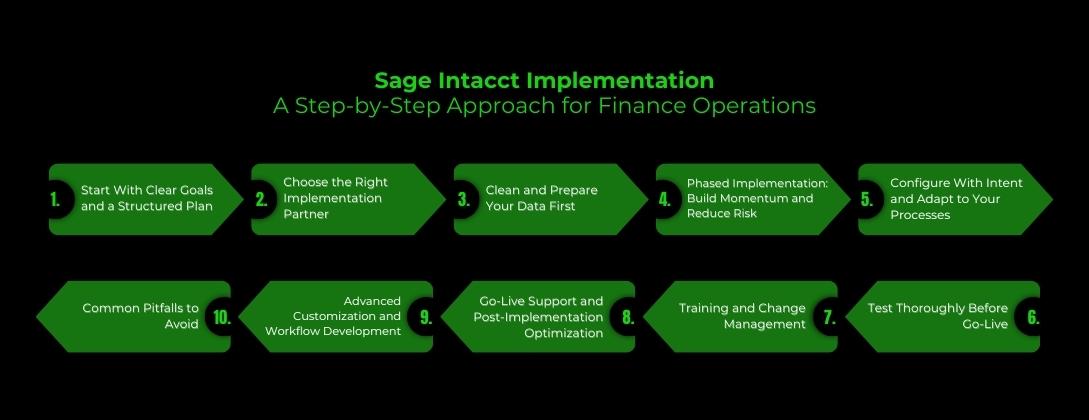
Learn how finance leaders can successfully implement Sage Intacct using proven best practices, phased execution, clean data strategies, and expert guidance to drive efficiency, visibility, and growth.
1. Start With Clear Goals and a Structured Plan
Before touching any configuration screens, success begins with clarity. One of the biggest root causes of implementation delays is not defining what success looks like.
Key Planning Practices:
- Define Business Objectives: What do you want Sage Intacct to enable? Faster month-end close? Better multi-entity consolidation? Automated workflows?
- Document KPIs: Establish measurable metrics such as days to close, percentage of automated entries, reporting turnaround time, etc.
- Form an Implementation Team: Assign roles — finance owners, IT leads, data specialists — with clear responsibilities and decision authority.
- Scope & Timeline: Establish realistic expectations, such as a 3–8 month window for mid-market companies, depending on complexity.
Pro Tip: Create a Success Criteria Document that outlines objectives, ownership, and key metrics to measure when the system is live.
2. Choose the Right Implementation Partner
Selecting an experienced Sage Intacct consulting services provider is one of the most critical decisions. The right partner brings not just technical knowledge, but industry expertise, governance discipline, and best practice frameworks.
At Techwize, we specialize in guiding mid-market companies in the USA through every step of their Sage Intacct journey. Our certified consultants combine deep financial system expertise with hands-on implementation experience, ensuring projects are delivered on time, within scope, and aligned with your business goals. With a focus on structured methodologies, post-go-live support, and measurable results, Techwize helps finance teams get the most value out of Sage Intacct.
What to Look For:
- Certified Sage Intacct consultants with real project experience
- Proven methodology with templates and checklists
- Transparent communication and documented deliverables
- Post-go-live support capability
FAQ: How do I choose the right Sage Intacct consulting services in the USA?
Select partners with industry experience, certified consultants, proven methodology, post-go-live support, and references. Ask about scope management and data ownership for predictable results.
3. Clean and Prepare Your Data First
Data migration is one of the most common challenges during ERP transitions. When data quality isn’t addressed early, issues surface later as broken reports, inaccurate dashboards, and long cleanup phases.
Data Preparation Checklist:
|
Task |
Why It Matters |
|---|---|
|
Clean master lists (vendors, customers, accounts) |
Prevents duplicates and mismatches post-migration |
|
Correct inconsistencies |
Ensures accurate financial reporting |
|
Decide on the historical data scope |
Too much legacy data can bloat; too little loses context |
|
Establish validation standards |
Early checks uncover hidden errors |
Common Migration Risks:
- Duplicated transactions
- Unmapped customers or cost codes
- Misconfigured dimensions or the chart of accounts
- Active third-party integrations are creating new transactions during migration
FAQ: Why is data migration critical in Sage Intacct implementation?
Accurate data migration is essential for reliable reports, seamless reconciliation, and long-term trust in the system.
4. Phased Implementation: Build Momentum and Reduce Risk
Implementing all Sage Intacct modules at once can overwhelm users and create unnecessary complexity. A phased rollout helps teams stabilize core operations before expanding functionality. Each phase focuses on a set of related modules and processes.
Phase 1: Core Financials (Foundation Stage)
- General Ledger (GL)
- Accounts Payable (AP)
- Accounts Receivable (AR)
- Cash Management
Purpose: Ensure core accounting operations are accurate and stable before introducing advanced features.
Phase 2: Operational & Specialized Modules
- Projects / Job Costing
- Revenue Recognition
- Billing and Invoicing
- Inventory Management
Purpose: Introduce operational modules that build on core financials, supporting day-to-day business operations.
Phase 3: Reporting, Dashboards & Automation
- Custom dashboards for CFOs, controllers, and finance managers
- Advanced reporting and KPI tracking
- Workflow automation and alerts
Purpose: Enable analytics, decision-making, and automation once core and operational processes are running smoothly.
Benefits of Phased Rollout:
- Reduces risk by not overloading users with too many changes at once
- Allows incremental validation of data and processes
- Helps the finance team gain confidence gradually
5. Configure With Intent and Adapt to Your Processes
Configuration should reflect how your organization actually works. Sage Intacct’s dimensional architecture allows you to build flexible reporting structures without proliferation of accounts.
Best Configuration Practices:
- Use meaningful dimensions aligned with your business (e.g., “Region,” “Department”)
- Avoid unnecessary account additions — use dimensions for flexibility
- Automate key controls using Smart Rules and Smart Events
- Set IDs and codes thoughtfully — these may be hard to change later
6. Test Thoroughly Before Go-Live
Testing is arguably the most important step before launching your new financial system. Adequate testing helps catch issues while there is still time to fix them.
Types of Testing:
- Unit Tests: Validate individual processes
- Integration Tests: Verify data flows between systems
- User Acceptance Testing (UAT): Involve actual users to replicate real workflows
During UAT, users should run actual day-to-day accounting processes — not just click through screens.
7. Training and Change Management
Even the most technically perfect implementation will fail if end users aren’t confident using the system. Training should be role-based and ongoing.
Training Strategy:
- Tailor sessions for different user roles (AP Clerk, Controller, CFO)
- Provide hands-on exercises, not just slide decks
- Build internal champions to support colleagues
- Offer post-go-live refresher sessions
- Review updates and new features regularly
“Technology alone doesn’t drive success — people do.”
8. Go-Live Support and Post-Implementation Optimization
Once live, the work doesn’t end — it just changes shape. The first few weeks after go-live are critical for addressing issues, reinforcing training, and optimizing performance.
Post-Go-Live Best Practices:
- Monitor KPIs against baseline goals
- Fine-tune workflows based on user feedback
- Identify additional automation opportunities
- Adjust reporting and dashboards for evolving needs
- Lean on your implementation partner’s support team
9. Advanced Customization and Workflow Development
Sage Intacct supports extensive customization through its built-in tools and APIs, enabling tailored workflows and smart business logic.
Examples of Custom Enhancements:
- Custom reports designed for strategic insights
- Smart Rules for automated controls
- Smart Events for notifications and conditional processes
- Custom fields and views aligned with operational needs
FAQ: Can Sage Intacct support custom workflows and app development?
Yes. Strategic customizations enhance efficiency but should scale with business growth to avoid upgrade challenges.
10. Common Pitfalls to Avoid
Even with a strong plan, teams can fall into traps that derail implementation:
- Replicating old, inefficient processes
- Weak change management and low user buy-in
- Underestimating reporting needs
- Over-customization that complicates future upgrades
- Choosing consulting services based solely on cost
Implementation Timeline: What to Expect
A typical Sage Intacct implementation for mid-market companies spans 3–8 months, depending on size, complexity, integrations, and data migration.
|
Phase |
Typical Duration |
|---|---|
|
Pre-configuration Planning |
1–3 weeks |
|
Core Configuration |
2–4 weeks |
|
Data Migration |
2–6 weeks |
|
Testing & Training |
4–8 weeks |
|
Go-Live & Stabilization |
1–2 weeks |
Conclusion
A successful Sage Intacct implementation is the difference between simply adopting new software and truly transforming your finance operations. With the right planning, clean data, phased execution, and strong user adoption, finance teams can unlock faster closes, better visibility, and scalable financial control.
This is where the right implementation partner matters. Techwize helps mid-market organizations turn Sage Intacct into a long-term finance advantage—not just a system go-live. With proven methodologies, certified consultants, and ongoing optimization support, Techwize ensures your Sage Intacct investment delivers measurable ROI and continues to evolve with your business.
When implemented right, Sage Intacct doesn’t just support finance—it elevates it.
Frequently Asked Questions (FAQs)
Q1: How long is Sage Intacct implementation for the mid-market?
Generally, it takes 3–8 months for implementation – varies based on the company size, multi-entity complexity, integrations and data migration needs.
Q2: What are the most common Sage Intacct implementation mistakes?
Some of the common stumbling points: "Reproducing old systems... poor change management, failure to recognize that you won't be able to report everything on day one, too much customization and a selection of low-cost consulting partners with no experience.
Q3: Why data migration plays an important role in Sage Intacct technology In this Information Age?
Data Migration That shit matters for correct financial reporting. Bad migration results in mistakes, discrepancy and time off.
Q4: How to pick the best Sage Intacct consulting services provider in USA?
Choose – A Partner who has experience in the industry so they know what you are talking about, certified consultants (whilst it is a bit of paper on the wall at least they have passed an exam!), a methodology that has been tried and tested, support after going live and reference sites.
Q5: Does Sage Intacct cater to custom workflows and app development?
Yes. Custom applications are possible via APIs and automation -Sage Intacct offers custom app development using APIS and Automation.