
 501, Fifth Avenue, Suite 805 New York, NY 10017
 info@techwize.com
 +1 (949) 887-0154
 TechWize

Overview of WordPress AI Assistant
The WordPress AI Assistant is an intelligent automation layer designed to enhance how businesses build, manage, and scale websites on WordPress. Powering over 40% of websites globally, WordPress remains the world’s most popular CMS, and AI is now redefining how content, performance, and user engagement are optimized within it. By embedding artificial intelligence directly into the WordPress ecosystem, organizations can automate content creation, SEO optimization, image generation, customer support, and site maintenance while reducing manual effort and operational costs. This shift toward AI-driven workflows helps teams publish faster, rank higher on search engines, and deliver more personalized digital experiences.
A WordPress AI Assistant leverages machine learning, natural language processing (NLP), and generative AI to provide real-time recommendations, smart editing, predictive insights, and automated actions. From generating SEO-friendly blog posts and meta descriptions to improving site speed, accessibility, and conversions, AI-driven WordPress solutions enable data-backed decision-making at scale, making them valuable for businesses focused on SEO for adult e-commerce. With businesses reporting 30–50% faster content production and measurable improvements in engagement and search visibility, AI assistants are quickly becoming essential for modern WordPress websites focused on growth, efficiency, and competitive differentiation.
What Is the WordPress AI Assistant?
The WordPress AI Assistant is an intelligent, built-in tool designed to help users create, optimize, and manage website content more efficiently within the WordPress ecosystem. It uses artificial intelligence technologies such as natural language processing (NLP) and generative AI to assist with tasks like content writing, blog generation, page copy creation, SEO optimization, summaries, and editing—all directly inside the WordPress editor. The goal is to simplify website management, reduce content creation time, and help businesses publish high-quality, search-optimized content without relying heavily on external tools or technical expertise.
As digital competition increased and content velocity became critical for SEO and conversions, WordPress introduced AI-powered capabilities to support creators, marketers, and businesses.
06 Key AI-Driven Features of the WordPress AI Assistant
The WordPress AI Assistant brings intelligent automation and contextual intelligence directly into the WordPress editor, helping businesses, marketers, and developers build high-performing websites faster. Designed for scalability, SEO optimization, and conversions, these AI-powered features support content creation, design customization, multilingual publishing, and collaborative workflows—making WordPress a smarter, more competitive CMS for modern digital businesses.
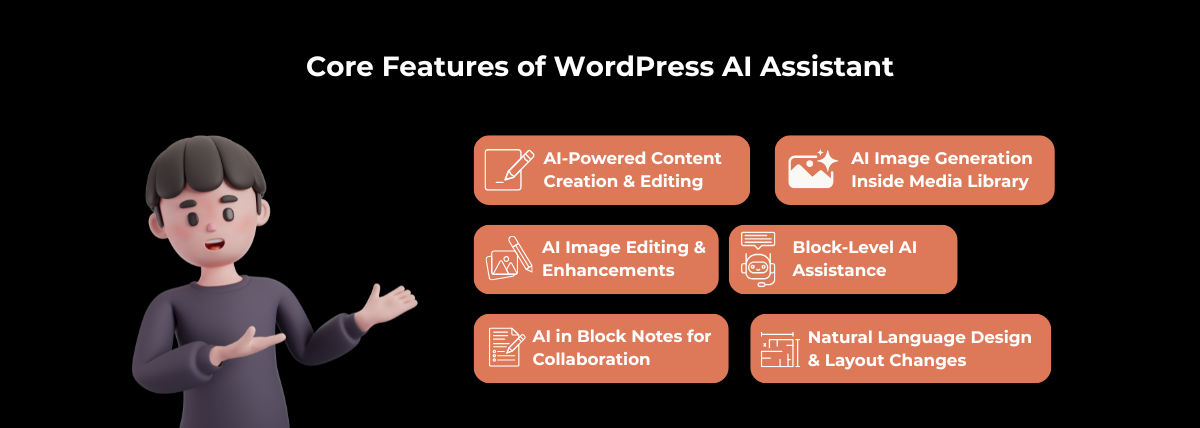
AI-Powered Content Creation and Editing
The AI-powered content creation in WordPress allows users to generate blog posts, landing pages, product descriptions, FAQs, and marketing copy directly inside the editor. With built-in AI SEO optimization for WordPress, content is automatically structured with optimized headings, keywords, and readability improvements. Businesses using WordPress AI content generators report faster publishing cycles and higher organic visibility—making this feature essential for companies investing in AI content automation services.
Natural Language Design and Layout Changes
Using natural language AI commands, users can update layouts, adjust spacing, realign sections, and improve page structure without coding. This AI website builder for WordPress simplifies no-code website customization, reduces development effort, and accelerates time-to-market for conversion-focused landing pages and business websites.
AI Image Generation Inside Media Library
The AI image generation feature in WordPress enables users to create custom visuals directly inside the Media Library. This eliminates dependency on third-party stock platforms while improving brand consistency and page engagement. Businesses looking for AI image generators for WordPress websites benefit from faster content creation and lower design costs.
AI Image Editing and Enhancements
With AI image editing for WordPress, users can automatically resize images, remove backgrounds, enhance quality, and optimize visuals for faster page load speeds. These AI-powered image optimization tools directly support SEO performance, Core Web Vitals, and user experience—key drivers for higher conversions.
Block-Level AI Assistance
The WordPress block editor AI provides intelligent suggestions at the block level, allowing users to rewrite paragraphs, improve headlines, and generate structured content within individual blocks. This AI block-level content optimization ensures consistency, relevance, and SEO alignment across every page section.
AI in Block Notes for Collaboration
The AI-powered collaboration tools in WordPress enhance team workflows by summarizing block-level feedback, suggesting improvements, and maintaining content clarity. Agencies and enterprises benefit from AI collaboration features for WordPress, reducing revision cycles and improving content governance.
How to Use the WordPress AI Assistant?
The WordPress AI Assistant makes it easy for businesses and creators to adopt AI-powered website management directly within WordPress. By enabling AI features in WordPress.com and using them inside the Block Editor, users can automate content creation, design updates, image generation, and collaboration—helping teams launch faster, optimize for SEO, and drive higher conversions.
Enabling the AI Assistant in WordPress.com
To start using the WordPress AI Assistant, log in to your WordPress.com dashboard and enable AI features from your site settings. Once activated, AI tools become available across content creation, design, and media workflows. This setup allows businesses to quickly adopt AI-powered WordPress tools without installing third-party plugins, making it a cost-effective option for companies looking to buy AI WordPress solutions or upgrade their existing CMS.
Guide link: https://wordpress.com/support/ai-website-builder/ai-tools/
Accessing AI Inside the Block Editor
The AI Assistant is accessible directly within the WordPress Block Editor, allowing users to work with AI-powered content tools at the block level. By selecting a block and choosing AI options, users can generate, rewrite, or optimize content in context—ensuring SEO-friendly structure and consistent messaging across pages and posts.
Using AI for Writing and Rewriting Content
With AI content creation for WordPress, users can draft blog posts, landing pages, product descriptions, and marketing copy in seconds. The AI can also rewrite existing content to improve clarity, tone, readability, and keyword usage. This feature is ideal for businesses focused on AI SEO optimization, content scalability, and faster publishing cycles.
Using AI for Layout and Design Changes
The AI website design assistant for WordPress allows users to update layouts, spacing, and alignment using simple natural language prompts. Whether refining a landing page or restructuring a service page, AI-driven layout changes help create conversion-optimized designs without coding—reducing development time and costs.
Generating Images with AI
Using AI image generation in WordPress, users can create custom visuals directly inside the Media Library. These AI-generated images can be used for blogs, banners, hero sections, and product pages, eliminating reliance on stock photos and supporting faster, more cost-efficient content creation.
Editing Existing Images Using AI
The AI image editing tools for WordPress allow users to enhance existing images by resizing, removing backgrounds, improving quality, and optimizing file sizes. These AI-powered enhancements improve page load speed, accessibility, and SEO performance—key factors in user experience and search rankings.
Using @AI in Block Notes
With @AI in Block Notes, teams can collaborate more effectively by asking AI to summarize feedback, suggest edits, or clarify changes within specific blocks. This AI-powered collaboration feature in WordPress is especially valuable for agencies and enterprise teams managing large content workflows.
Managing AI Settings and Permissions
WordPress allows administrators to manage AI settings and user permissions, ensuring secure and controlled usage across teams. By defining who can access AI writing, image generation, and design tools, businesses can maintain content quality, brand consistency, and governance while scaling AI adoption.
Benefits of the WordPress AI Assistant
The WordPress AI Assistant delivers measurable business value by combining AI-powered content creation, no-code website customization, and intelligent automation directly within WordPress. These benefits make it a strategic choice for businesses looking to invest in AI-powered WordPress solutions, reduce operational complexity, and accelerate digital growth.
Faster Website Creation and Updates
With AI-powered WordPress website creation, teams can launch pages, blogs, and landing experiences significantly faster. The AI Assistant enables instant content generation, layout changes, and image creation—reducing development cycles from days to hours. Businesses choosing to buy AI WordPress development services benefit from quicker go-to-market timelines and faster website updates without ongoing manual effort.
Reduced Dependency on Plugins and External Tools
The built-in WordPress AI Assistant eliminates the need for multiple third-party plugins and external AI tools for writing, SEO, image generation, and design. By consolidating these capabilities into a single platform, businesses lower maintenance risks, improve site performance, and reduce subscription costs—making it a cost-effective option for organizations planning to purchase AI-enabled WordPress solutions.
No-Code Website Customization
Through no-code AI website customization in WordPress, users can update layouts, styles, and page structures using simple natural language prompts. This empowers marketers and business users to manage websites independently, reducing reliance on developers and agencies. Companies adopting AI no-code WordPress tools gain agility and flexibility while controlling development expenses.
Improved Content Quality and Consistency
The AI content optimization features in WordPress ensure consistent tone, structure, and SEO alignment across all pages. By improving readability, keyword usage, and messaging clarity, the AI Assistant helps businesses maintain high-quality content standards—essential for brands investing in AI-driven content marketing services and conversion-focused websites.
Enhanced Team Collaboration
With AI-powered collaboration tools in WordPress, teams can streamline reviews, edits, and feedback using features like @AI in Block Notes. This reduces revision cycles and miscommunication, making it easier for agencies and enterprises to manage large-scale websites. Organizations looking to upgrade to enterprise AI WordPress solutions benefit from smoother workflows and improved content governance.
Cost and Time Efficiency
By automating content creation, design updates, image editing, and SEO tasks, the WordPress AI Assistant significantly reduces both time and operational costs. Businesses leveraging AI-powered WordPress automation services can reallocate resources to strategic initiatives while achieving higher ROI—making AI an essential investment for scalable digital growth.
Theme and Style Adjustments Using AI
With AI theme customization in WordPress, users can automatically apply fonts, colors, spacing, and branding styles using intelligent recommendations. This AI-driven website styling solution ensures visual consistency while accelerating redesigns, rebranding, and UI optimization projects.
Multilingual Content Support
The AI multilingual support for WordPress enables seamless translation and localization while preserving SEO structure and brand tone. Businesses expanding globally can use AI-powered WordPress translation tools to manage multilingual websites efficiently and improve international search visibility.
Context-Aware Page and Site Editing
The context-aware AI editing in WordPress understands page intent, site hierarchy, and user behavior to provide intelligent content and linking recommendations. This AI-powered WordPress optimization improves internal linking, content relevance, and conversion rates—making it a strategic investment for businesses seeking AI-driven website growth solutions.
Difference Between WordPress AI Assistant vs Traditional WordPress Workflow
The table below highlights how the WordPress AI Assistant modernizes website creation compared to the traditional WordPress workflow. Businesses looking to buy AI-powered WordPress solutions, reduce development time, and improve ROI can clearly see the operational and commercial advantages of adopting AI-driven workflows within WordPress.
|
Aspect |
WordPress AI Assistant Workflow |
Traditional WordPress Workflow |
|
Content Creation |
AI-powered content creation generates SEO-optimized blogs, pages, and product content instantly, supporting faster publishing and content scalability. |
Content is written manually or outsourced, increasing turnaround time and content production costs. |
|
Content Editing & Optimization |
AI automatically rewrites, improves readability, tone, and keyword placement for better SEO and conversions. |
Manual editing and SEO optimization require expertise, plugins, and repeated revisions. |
|
Website Design & Layout |
No-code AI website customization allows layout and design changes using natural language commands. |
Design updates require theme customization, CSS, or developer involvement. |
|
Image Creation & Editing |
Built-in AI image generation and AI image editing tools eliminate dependency on stock platforms and design software. |
Images must be sourced externally and edited using third-party tools before upload. |
|
SEO Optimization |
AI-driven WordPress SEO optimization improves structure, internal linking, and on-page SEO automatically. |
SEO relies on multiple plugins and manual configuration. |
|
Plugin Dependency |
Reduced reliance on plugins with built-in AI features for content, design, and media management. |
Heavy dependency on multiple plugins increases maintenance, conflicts, and security risks. |
|
Collaboration & Workflow |
AI-powered collaboration with @AI in the Block Notes streamlines feedback, summaries, and content alignment. |
Collaboration happens outside WordPress using emails or documents, slowing approvals. |
|
Time to Market |
Faster website launches and updates, ideal for businesses investing in AI WordPress development services. |
Slower deployment due to manual workflows and cross-team dependencies. |
|
Cost Efficiency |
Lower operational costs by consolidating tools and reducing developer and agency dependency. |
Higher costs due to external tools, plugins, developers, and content services. |
|
Scalability & Growth |
AI-powered WordPress automation supports scalable content and global growth strategies. |
Scaling requires additional resources, tools, and manual processes. |
Final Thoughts on the WordPress AI Assistant
The WordPress AI Assistant marks a significant shift in how websites are created, managed, and scaled within WordPress. By embedding AI-powered content creation, no-code website customization, intelligent image generation, and context-aware optimization directly into the core WordPress experience, it removes many of the limitations of traditional workflows. Businesses can now publish faster, maintain consistent content quality, and optimize for SEO and conversionsall without heavy reliance on plugins, developers, or external tools.
For organizations evaluating whether to buy AI-powered WordPress solutions or upgrade to AI-enabled WordPress development services, the value proposition is clear. The WordPress AI Assistant delivers measurable gains in productivity, collaboration, and cost efficiency while supporting scalable digital growth. As AI continues to shape the future of content management and web development, adopting the WordPress AI Assistant is not just a feature upgrade it is a strategic investment in building smarter, faster, and more competitive websites.